
Why do paid parking operations get difficult?
In a paid car park, revenue depends on how often the gate opens and whether each opening is recorded with the right fee. In manual operation many links in that chain rely on staff:
Dependence on staff and shifts
The booth needs a cashier every shift; finding staff for nights, weekends and holidays and controlling that cost gets harder.
Cash desk and cash control
Cash counting, shortfalls and shift handovers run manually; holding each cashier to account takes time.
Unrecorded passages
If barrier openings without a reason, free passages and discounts are not logged, revenue leakage goes unnoticed.
Queues at the exit
When payment happens at the barrier, vehicles queue in the exit lane at peak hours.
Manual plate and time checks
When entry time is kept on a ticket or in a log, lost tickets and duration disputes follow.
Managing different tariffs
Applying separate fees for cars, vans, subscribers and guests by hand increases errors.
Subscriptions and reporting
Tracking subscription expiries and daily revenue in spreadsheets makes data late and scattered.
Multiple locations
When each car park is run separately, checking devices on site and watching revenue centrally becomes difficult.
How does unmanned parking automation digitise the process?
Automation turns each step a cashier does by hand into a recorded flow. The plate is detected, the entry time recorded, the duration calculated, the tariff applied, payment taken, an exit authorisation created, the plate verified again, the barrier opened and the transaction reported.
- Entry camera
- Plate recognition
- Parking software
- Kiosk / payment
- Payment approval
- Exit grant
- Exit camera
- Barrier
- Report
This flow reduces dependence on staff, digitises collection, centralises transaction records, lowers the risk of manual errors and makes passages and revenue traceable. It does not remove every on-site risk; plate reading conditions, barrier maintenance and a backup payment channel still need planning.
How can unmanned paid parking work? Three operating models
Three basic architectures are used in the market. Sole offers the ticketless model based on plate recognition; QR code is a payment method within that model.
A — QR code unmanned parking payment
The vehicle is still identified by its plate at entry. The driver enters the plate at the kiosk or exit terminal, sees the fee and chooses QR at the payment step; the QR code shown by the POS device is scanned with a phone, payment is verified, an exit authorisation is created and the barrier opens. It gives drivers without a card a second digital way to pay. No separate mobile app or QR entry ticket is used. Details: QR code parking payment system.
B — Plate recognition based paid parking
This is Sole's main model. The entry camera reads the plate and an entry record is created; the driver enters the plate at a kiosk or exit terminal, the duration is calculated, the fee is shown, payment is made by card or QR, an exit right is created; the exit camera reads the plate, payment is checked and the barrier opens. There are two ways to apply it: a kiosk at a pedestrian pay point, and an exit payment terminal in the lane where drivers pay without leaving the car. Read performance depends on camera angle, plate condition and lighting and is planned for the site during the survey.
C — Ticket or Mifare card paid parking (Legacy Technology Architecture)
In this architecture a loop detector senses the vehicle at entry and a machine issues a paper ticket or Mifare card; the ticket is read to pay at the exit. Sole does not offer this model: because it needs ticket and card consumables, creates lost-ticket disputes and requires ticket machine maintenance, we recommend the plate-based ticketless model. Sites with a ticket system can be converted to plate recognition.
| Topic | A — QR code payment | B — Plate recognition payment | C — Ticket / Mifare card |
|---|---|---|---|
| Vehicle identification | Plate recognition (QR only at the payment step) | Plate recognition | Paper ticket or card |
| Payment point | Kiosk or exit terminal | Kiosk, exit terminal, booth, handheld terminal | Pay station with ticket reader |
| Payment method | Scanning a QR code with a phone | Contactless card, QR; cash at the booth | Card / cash depending on the model |
| Lost ticket risk | None | None | Yes |
| Consumables | Receipt paper | Receipt paper | Tickets / cards, receipt paper |
| Sole support | Yes | Yes (main model) | Not offered — alternative market architecture |
How does an unmanned car park work, step by step?
The flow below is the path a visitor vehicle follows from entry to exit in the plate recognition model:
- The vehicle arrives at the entry. The entry camera reads the plate; the vehicle's photo, type, colour and make are recorded.
- An entry record is created. A subscriber is recognised from the whitelist; for a visitor a paid parking session opens and the barrier lifts.
- The vehicle stays in the car park. The panel shows vehicles inside, capacity and occupancy in real time.
- The driver goes to a payment point. They enter the plate at the kiosk or exit terminal; the kiosk screen works in 6 languages.
- The fee is calculated. The software applies the tariff of the vehicle's fee class to the duration; previous debt and extra services are shown on separate lines.
- Payment is taken. The driver pays by contactless credit/debit card or QR code; the fiscal receipt is issued by the integrated fiscal POS device and the kiosk prints a receipt.
- An exit grant is created. A single-use exit grant is issued for the parking session and sent to the site PC; the exit period counts down on screen.
- The plate is verified again. The exit camera reads the plate; the site PC checks the grant locally.
- The barrier opens. If the grant is valid the barrier relay is triggered; an optional loop + plate double check can be applied.
- The transaction is reported. Passage, payment and channel data are written to the revenue and collection reports.
For details of the fee logic see our guide to plate-based parking fees.
What is the Unmanned Exit Payment Terminal and how does it work?
Direct answer: The Unmanned Exit Payment Terminal is an Android-based touchscreen payment device mounted beside the barrier in the exit lane, at driver window height. When the vehicle reaches the lane, the exit camera reads the plate; the plate, parking time and amount appear on the terminal screen automatically, the driver pays by contactless card or QR code without leaving the car, and the barrier opens once payment is approved. The driver does not type the plate or walk to a kiosk.
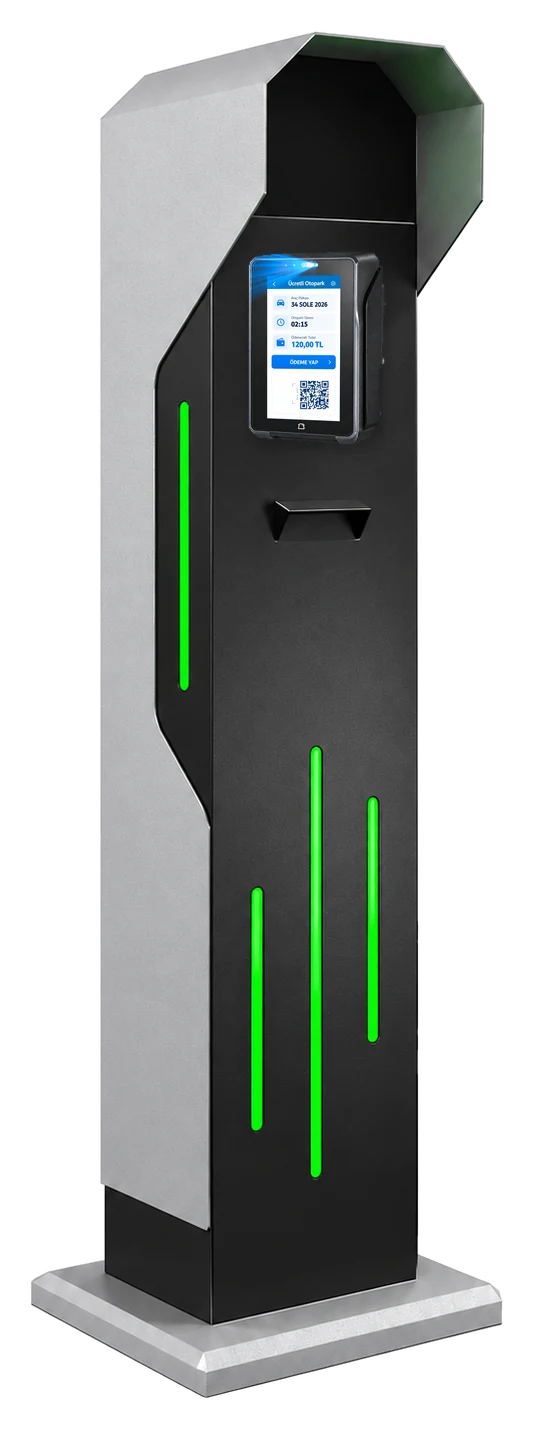
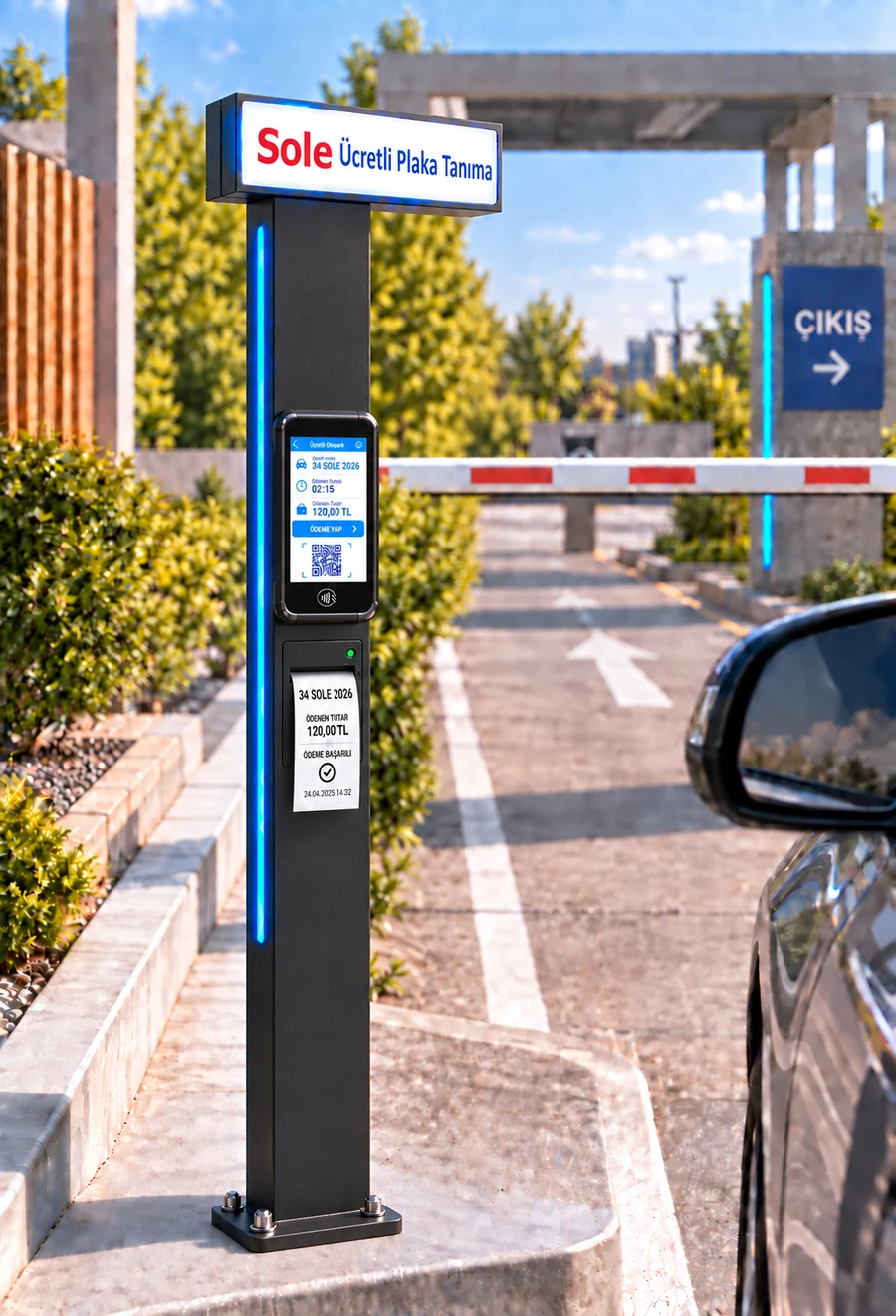
Paying at the Unmanned Exit Payment Terminal, step by step
- 1. The vehicle approaches the exit lane; the exit camera linked to the terminal reads the plate.
- 2. Plate, entry time, parking duration and amount appear on the terminal screen automatically.
- 3. For a subscriber or a zero-amount passage no payment step opens; the barrier opens directly.
- 4. For a paying vehicle the driver taps a card or scans the QR code with a phone; the amount is passed from the software to the POS.
- 5. The fiscal receipt is issued by the integrated fiscal POS device; payment approval creates the exit grant and the barrier opens.
- 6. The transaction is written to the Exit Terminal report with plate, photo, duration, amount and payment channel.
Kiosk or Unmanned Exit Payment Terminal?
| Topic | Payment kiosk | Unmanned Exit Payment Terminal |
|---|---|---|
| Location | Near the pedestrian exit | In the exit lane, beside the barrier |
| Driver | Leaves the car and walks to the kiosk | Stays in the car |
| Plate entry | Typed by the driver | Comes automatically from the exit camera |
| Payment | Contactless card, QR | Contactless card, QR |
| Cash | No | No |
| Peak hours | Paid in advance, so short queue at the barrier | Paid at the exit, so a queue can form in the lane |
| Best for | Multi-storey sites with several pedestrian exits | Small and mid-size car parks with a single exit |
Both channels can be installed together: at busy sites the kiosk takes payment before the exit, while the exit terminal lets drivers who skipped the kiosk pay in the lane. Details: pay by card at the exit, contactless parking payment.
Hardware of parking payment kiosks
The kiosk family has four models. On every model the fee is calculated on the server and payment is taken by card; kiosks do not accept cash.
22–32 inch touchscreen
Smart KIOSK: 32-inch portrait Full HD, 10-point capacitive; Small, Middle and Grand: 22–24 inch touchscreens.
Contactless POS and QR
The amount is passed from the screen to the integrated POS device; payment by contactless card and QR code.
Thermal receipt printer
3-inch thermal printer on the Smart KIOSK; receipt header and footer are edited in the panel.
NFC and QR reader
The Smart KIOSK has NFC reader and QR code reader slots.
Ethernet, Wi-Fi, optional 4G
The Smart KIOSK connects via Gigabit Ethernet and Wi-Fi; an optional 4G modem can be added.
Windows or Android
The kiosk software runs on an industrial Windows PC and on Android-based touch devices.
6-language interface
Turkish, English, German, Spanish, Russian and Arabic; the screen switches to right-to-left in Arabic.
Remote monitoring
Kiosk transactions and errors appear in a list refreshed every few seconds in the panel.
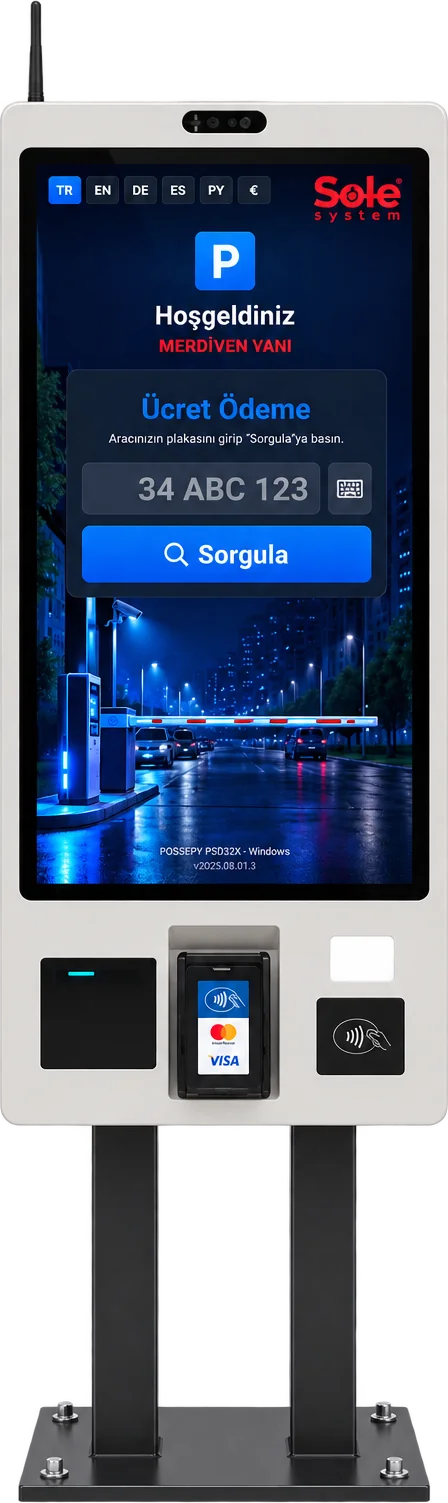
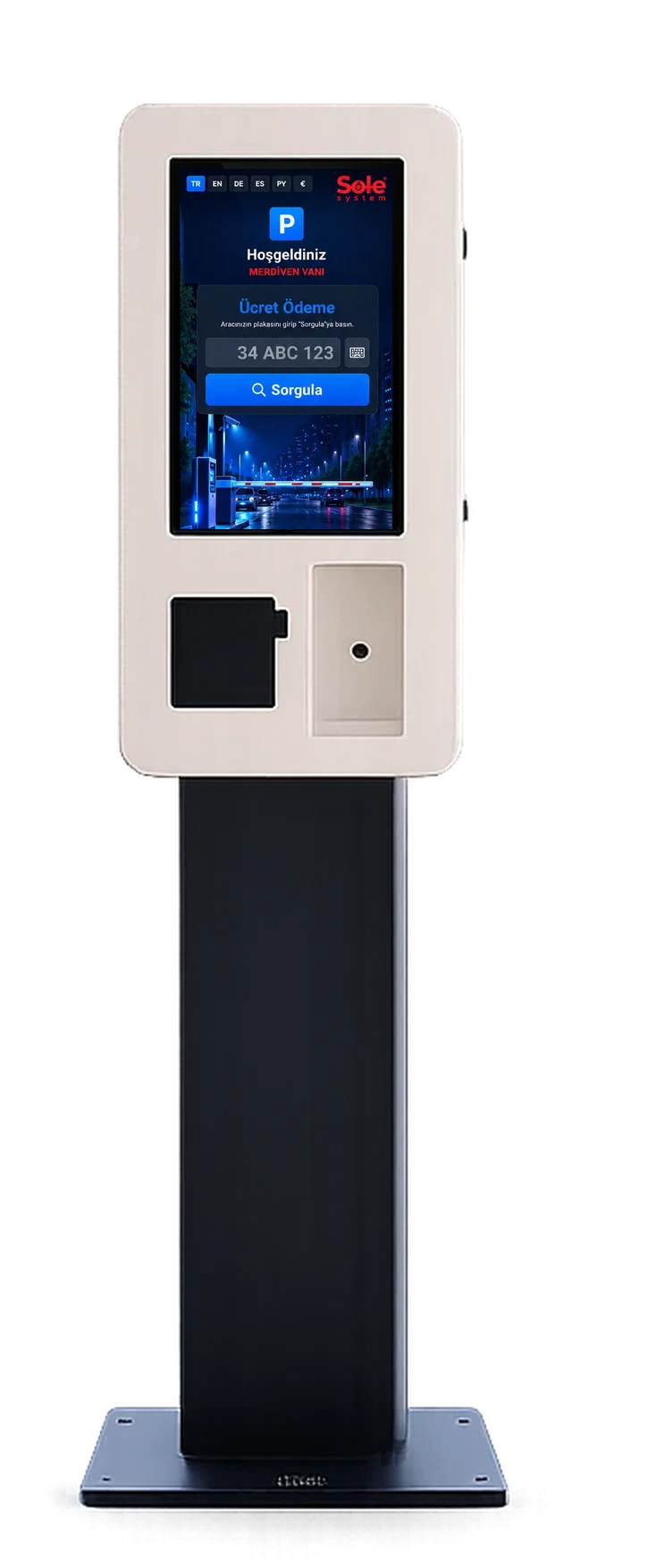
Technical comparison of kiosk models
| Feature | Smart KIOSK | Small KIOSK | Middle KIOSK | Grand KIOSK |
|---|---|---|---|---|
| Screen | 32" portrait, 1920×1080 | 24" touchscreen | 22" touchscreen | 22" touchscreen |
| Touch | 10-point capacitive (PCAP) | Touch | Touch | Touch |
| Payment | Contactless card + QR | Credit/debit card | Credit/debit card | Contactless card + QR |
| Printer | 3-inch thermal receipt | Kiosk receipt printer | Kiosk receipt printer | Kiosk receipt printer |
| Computer | Industrial PC or Android | — | Industrial PC | Industrial PC |
| Connectivity | Ethernet + Wi-Fi, opt. 4G | Ethernet | Ethernet | Ethernet |
| Extra readers | NFC, QR reader | — | — | — |
| Cash | No | No | No | No |
| Body | Free-standing portrait | Compact | Mid-size | Large body |
Model details: Smart KIOSK, Small KIOSK, Middle KIOSK, Grand KIOSK.
What can be managed with paid parking software?
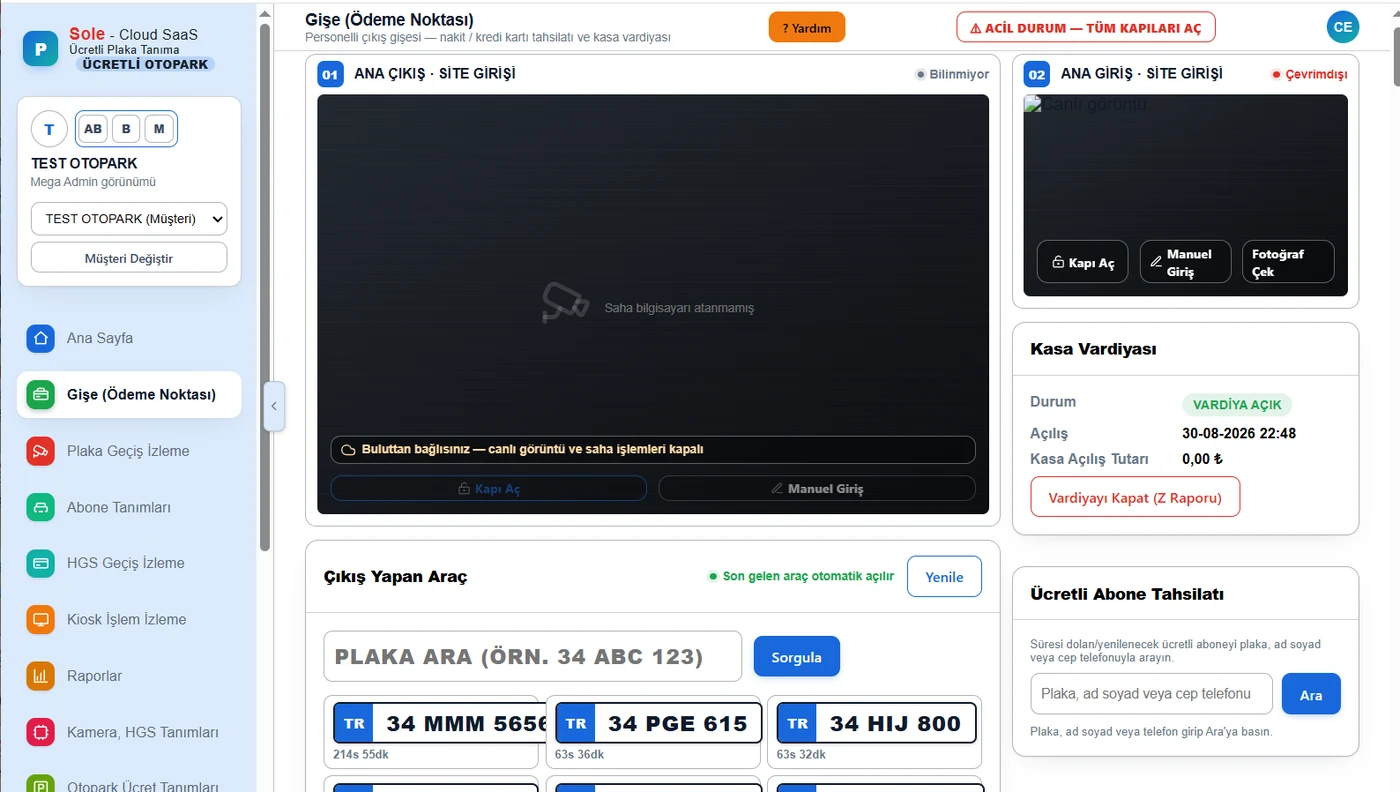
The Sole paid parking software runs in the cloud, is managed in a browser and works in sync with the site PC. What can be managed:
- Passages and plates: Photo-backed entry and exit records with vehicle type, colour and make; plates from 45 countries; live monitoring; recovering missed passages from the camera; plate correction.
- Fees and tariffs: Free period, first hour, following hours and daily cap per vehicle class; fixed multi-day packages; tariff versioning (past transactions keep their own tariff); VAT group code per tariff.
- Subscribers, guests and lists: Monthly paid subscriptions with renewal at the kiosk; guest/visitor vehicles; whitelist stored on the camera; blacklist alarms; capacity and occupancy control.
- Collection: Booth (cash with change calculation, card), kiosk, exit terminal and handheld terminal; discounts, free passages, debt, refunds and cancellations with a reason; cash shifts with a numbered Z report; extra services such as car washing.
- Devices: Camera, barrier, loop, photocell and LED display definitions; kiosk pairing code; connection status; site software updated from the central panel.
- Users and permissions: Role-based users; permissions per page and report; access to several car parks with one account.
- Data and integration: Cloud database with a local copy on site; 1–60 month retention for passage records; PDF, Excel and Word export. Transfer to ERP, accounting or property management software is developed per project.
Which payment methods are supported?
Card and QR payments are taken through an integrated new-generation fiscal POS device (ÖKC); the fiscal receipt is issued by that device. The software does not connect to the Revenue Administration (GİB) directly; it passes the amount and the tariff's VAT group code to the device. By channel:
| Channel | Contactless card | QR code | Cash | Use |
|---|---|---|---|---|
| Smart KIOSK / kiosk | Yes | Yes | No | Pedestrian pay point, 6 languages |
| Android exit payment terminal | Yes | Yes | No | In the exit lane, without leaving the car |
| Android handheld terminal | Yes | Yes | Yes | On-site attendant |
| Booth PC (with POS device) | Yes | Yes | Yes (change calculation) | Staffed or semi-unmanned booth |
For a comparison of channels see parking payment systems; for the device connection see parking POS integration.
How Does QR Code Parking Payment Work?
In an unmanned paid car park, the QR code is used only at the payment step: no separate QR ticket is printed at entry and the driver does not need to download a mobile app. The vehicle is recorded by its plate at entry; before leaving, the driver uses the “Pay with QR” option at the payment point.
- The driver enters the plate at the kiosk or exit terminal, or the plate comes from the exit camera; the duration and amount are shown on screen.
- “Pay with QR” is selected; the QR payment screen opens on the POS device.
- The driver completes payment via QR with the payment app on their phone.
- The approval is sent to the parking software and the fiscal receipt is issued by the POS device; an e-Archive document query QR is also shown on screen.
- A single-use exit permit is created for the parking session; when the exit camera reads the plate, the barrier opens.
QR payment can be taken at the Smart KIOSK, the Unmanned Exit Payment Terminal, a booth with a POS device and a handheld terminal. Details: QR code parking payment system.
Credit Card and Contactless Parking Payment
With card payment, the parking fee is calculated on the server from the plate and length of stay; the amount is sent to the POS device at the payment point without manual entry, and the driver taps a credit or debit card. Card reading and approval happen on the POS device; card details are not stored in the parking software, which only receives the transaction result and amount.
- Less risk of wrong charges: nobody enters the amount manually.
- Every payment matches a parking session: it appears in the Credit Card Payments and POS Transaction Reconciliation reports.
- Shorter waits at the barrier: payment is made before exit at the kiosk or in the exit lane without leaving the car.
- Fiscal receipt from the POS device: the kiosk also prints an information slip.
- No cash at kiosks and exit terminals: drivers who want to pay cash use the booth or a handheld terminal.
The step-by-step flow is explained on our contactless parking payment system and pay-at-exit by credit card pages.
Which payment model suits your car park? 5 models compared
There is no single “right” payment point in an unmanned paid car park; the facility layout, number of exits, traffic and cash needs decide. A decision table for operators:
| Model | How it works | Best-suited facility | Staff | Cash |
|---|---|---|---|---|
| Smart KIOSK | Pedestrian payment point; the driver pays by card or QR before returning to the car | Multi-storey sites with several pedestrian exits: malls, hospitals, business centres | Not needed (remote monitoring) | No |
| Unmanned Exit Payment Terminal | In the exit lane; the driver pays by card or QR without leaving the car | Single-exit car parks where no pedestrian point is wanted | Not needed | No |
| QR payment | A payment method added to the kiosk, terminal, booth and handheld terminal | Any facility with drivers who prefer to pay without a card | Depends on channel | — |
| Hybrid: booth + kiosk | The booth handles cash and special cases, the kiosk other payments; the booth is open at peak hours | Facilities moving from staffed to unmanned or needing cash | Shifts / partial | Yes, at the booth |
| Handheld terminal | Staff collect by card, QR or cash next to the car and print a receipt | Open-air car parks, event areas, extra collection at peaks | Attendant | Yes |
Models can be combined; for example a Smart KIOSK at the pedestrian exit, an Unmanned Exit Payment Terminal at the vehicle exit and a handheld terminal for peak hours. To compare all payment points on one page see exit terminal, smart payment kiosk and handheld terminal.
How does the barrier open after payment? Barrier integration
Kiosks and exit terminals do not connect to the barrier directly. When payment is approved, the software issues a single-use exit grant for the parking session and sends it to the site PC. When the vehicle reaches the exit, the camera reads the plate, the grant is verified locally and the barrier relay is triggered. Because this check happens on site, a paid vehicle can leave even if the internet is down.
- The exit period after payment defaults to 20 minutes and can be changed per kiosk; if exceeded, only the difference is charged.
- With the optional loop + plate double check, the barrier opens only when the ground sensor and the plate match together.
- Existing boom barriers, sliding gates or bollards are kept if they can be controlled by a relay.
- Barrier openings from the panel are logged with a reason; openings without a reason are flagged in the report.
Cloud management and running several car parks from one panel
The software is cloud based and used in a browser without installing a program. Each car park is defined as a separate facility; an authorised user accesses several car parks with one account. The site PC keeps the whitelist, a mirror of the tariff and the exit grants locally; if the connection drops, the passage decision and fee calculation continue on site and records are completed when the connection returns.
- The site software is updated from the central panel with version integrity checks and rolls back if something goes wrong.
- If the site PC loses its connection, an optional email alert is sent to the manager.
- Camera connection status and kiosk errors are monitored in the panel.
For software editions see Sole Cloud SaaS LPR software.
How is parking revenue reported?
The software has 51 ready-made reports: 27 in every edition and 24 specific to paid parking. All reports can be printed and exported to PDF, Excel and Word.
- Revenue and collection: Parking Revenue, Vehicle Class Breakdown, Credit Card Payments, Subscription Payments, Offline Payments, POS Transaction Reconciliation, POS Print Report.
- Control: Debt, Refunds, Discounts, Free Passages, Barrier Openings, Payment Recovery.
- Channels: Booth PC (per cashier), Kiosk Transactions, Exit Terminal, Handheld Terminal; a numbered Z report when a cash shift closes.
- Passages and occupancy: passage summary, plate passages, per-gate report, occupancy, average parking time.
The dashboard shows daily revenue split into cash, credit card and kiosk. For details see the parking reporting system page.
Business benefits of an unmanned parking system
Less dependence on staff
Collection moves to the driver; the booth can stay open only at peak hours or for cash.
24/7 operation
Kiosks and exit terminals run at night, at weekends and on holidays without shifts.
Central revenue tracking
Daily revenue is shown on the dashboard split into cash, card and kiosk.
Traceable passages
Every passage is recorded with a photo; payment and exit are tied to the same parking session.
Automatic tariffs
The fee class is selected from the camera; different tariffs are not calculated by hand.
Several sites, one panel
An authorised user manages multiple car parks with the same account.
Remote technical control
Device connections and kiosk errors are monitored in the panel; site software is updated remotely.
Faster exits
Payment happens before the exit, so waiting at the barrier is shorter.
Who is unmanned parking suitable for?
Any paid car park with steady visitor traffic suits this model. The decision depends on the number of lanes, the share of cash demand and queues at peak hours.
| Facility type | Typical need | Suggested setup |
|---|---|---|
| Shopping mall | Heavy weekend exits, free period | A kiosk at each pedestrian exit, free initial period, exit terminal |
| Hospital | 24/7 visitors; staff and ambulance separation | Staff on the whitelist, visitors pay at the kiosk |
| Hotel | Separating hotel guests from outside visitors | Guest definitions, kiosk with a 6-language screen |
| Business centre | Tenant subscribers and hourly visitors | Monthly subscriptions, renewal at the kiosk, exit without a booth |
| Residential site | Resident vehicles and paid visitors | Residents on the whitelist, paid visitor parking |
| Municipality | City car parks, multiple locations | A kiosk per location, managed from one panel |
| Bus terminal | Fees and entry rules by vehicle type | Fee class from the camera, payment at exit |
| Factory and logistics | Visitor and supplier vehicles | Whitelist + paid visitor session |
| Private parking operator | Low staff cost, night operation | Kiosk + exit terminal, semi-unmanned booth |
Real projects and a sample system architecture
Günsa paid parking — Gebze / Kocaeli
A plate recognition camera was installed at the entry and at the exit; entries are recorded automatically, the fee calculated from the duration is shown on an LED display at the exit, payment is taken at the booth by POS device or cash and the barrier opens. Lost tickets are no longer an issue; the system has been running without interruption for 3–4 years. Project details
Tekirdağ Bus Terminal — Tekirdağ
At the entry, ground and pole sensors detect vehicle size; the software lets only buses and minibuses in. At the exit, the fee calculated from the duration is shown on an LED display and the vehicle leaves after payment. Project details
Both projects are staffed plate recognition car parks; adding kiosks and exit terminals to the same infrastructure moves them to the unmanned model.
Sample system architecture (one entry, one exit)
| Entry | 1 plate recognition camera, 1 boom barrier, optional loop |
|---|---|
| Exit | 1 plate recognition camera, 1 boom barrier, 1 Android exit payment terminal |
| Pedestrian pay point | 1 Smart KIOSK (contactless POS, QR, receipt printer) |
| Booth cabinet | PoE switch, electrical protection, barrier relay connections |
| Site | 1 site PC (local decision, exit grant, offline fee calculation) |
| Management | Cloud panel, 51 reports, email alerts |
This table is a sample architecture, not a real customer project. The exact list is prepared after a site survey.
Technical summary
| Recognition | Plate recognition camera (ANPR/LPR), vehicle type/colour/make, plates from 45 countries |
|---|---|
| Payment points | Smart KIOSK, Android exit payment terminal, Android handheld terminal, booth PC with POS device |
| Payment methods | Credit card, debit card, contactless, QR code; cash only at the booth and handheld terminal |
| Fiscal receipt | Issued by the integrated fiscal POS device; VAT group code per tariff |
| Barrier control | Camera or site control card relay; loop and photocell inputs; optional loop + plate double check |
| Offline operation | Passage decision, whitelist and exit grant on site; offline fee calculation matches the cloud tariff |
| Software | Cloud SaaS, browser access, local copy on site, multiple car parks |
| Reports | 51 ready-made reports (27 general + 24 for paid parking); PDF, Excel, Word |
| Notifications | Email reports and offline connection alerts; subscription messages on the LED display |
| Integration | Developed per project |
Staffed versus unmanned parking
| Topic | Staffed car park | Unmanned car park |
|---|---|---|
| Collection | Cashier at the booth | The driver pays at the kiosk or exit terminal |
| Operating hours | Limited to shifts | Continuous, including nights and holidays |
| Cash desk | Shift open/close and Z report | Per-channel revenue report; cash only at the booth and handheld terminal |
| Queues | Depends on cashier speed | Payment happens before the exit, so waiting at the barrier is shorter |
| Staff | A cashier per shift | Routine checks and maintenance |
| Cash | Taken at the booth | Taken at the booth or on a handheld terminal in a semi-unmanned setup |
Semi-unmanned (hybrid) model
Most facilities do not switch to unattended operation in one step. The booth stays open at peak hours while only kiosks and exit terminals work in the evening and at night. The software supports both at once: collections are reported per channel and cash shifts are kept only on staffed channels.
How is the price of an unmanned parking system determined?
Instead of a fixed list price we give a project-based quote after a site survey. The items that set the price:
- Number of entry and exit lanes, and so the number of cameras
- Whether barriers are new or existing
- Number and model of kiosks and exit terminals
- Booth cabinet, cabling and trenching
- Software licence and the modules used
- Installation, training and annual maintenance scope
For the cost items in detail see the parking kiosk system pricing and LPR system pricing guides.
Frequently asked questions
What is an unmanned paid parking system?
An unmanned paid parking system is a car park setup in which the plate is read at entry, the software calculates the parking time against a defined tariff, the driver pays at a kiosk or exit terminal, and once payment is approved the exit camera recognises the plate and lifts the barrier. It reduces the need for permanent booth staff and records every passage and payment centrally.
How does an unmanned car park work?
The entry camera reads the plate and records the entry time. Before leaving, the driver enters the plate at a kiosk or exit terminal; the software applies the tariff to the duration and shows the amount. Once card or QR payment is approved, an exit grant is created; when the exit camera reads the plate the barrier opens and the transaction is reported.
What is a parking payment kiosk?
A parking payment kiosk is a self-service touchscreen payment point where drivers pay the parking fee themselves by entering their plate. On Sole kiosks the fee is calculated on the server; the screen shows the entry photo, duration, any debt and extra services, payment is taken by contactless card or QR code, and a receipt is printed.
What is the Unmanned Exit Payment Terminal?
An Android-based payment device mounted beside the barrier in the exit lane. The exit camera reads the plate, the amount appears on screen automatically, the driver pays by card or QR without leaving the car and the barrier opens.
How does a parking kiosk work?
The driver types the plate on the on-screen keyboard and searches. The kiosk shows the entry photo, entry time, duration and amount; if the vehicle type is wrong the driver selects the correct one and the amount is recalculated. After payment a receipt is printed and the remaining exit time counts down.
How does paid parking software work?
The software turns entry and exit records from the cameras into parking sessions, applies the tariff for the vehicle class, records payments per channel and sends the exit grant to the site PC after payment. It runs in the cloud and is managed in a browser; the passage decision is still made on site if the internet drops.
How is the fee calculated from the plate?
The tariff of the vehicle's fee class is applied to the time between entry and payment: free period, first hour, following hours, daily cap and any multi-day package. The fee class is selected automatically from the vehicle type recognised by the camera. The calculation always runs on the server; the payment device never sets the fee.
How is payment made by credit card?
When the amount is confirmed at the kiosk or exit terminal, the payment step opens and the amount is passed to the integrated POS device. The driver taps a credit or debit card; after approval a receipt is printed and an exit grant is created. Card and QR payments are also taken at the booth and on handheld terminals.
Is contactless payment possible?
Yes. Kiosks and exit terminals take contactless credit and debit card payments. Because the amount is passed from the kiosk screen to the POS device, the driver does not enter an amount; they only tap the card.
Can parking be paid with a QR code?
Yes. At the kiosk, exit payment terminal, booth with POS device and handheld terminal a QR option is offered at the payment step; the QR code shown by the POS device is scanned with a phone to pay. When approved, the transaction is recorded like a card payment and an exit grant is created. Vehicles still enter by plate recognition.
Is cash accepted?
Kiosks and exit terminals do not accept cash. Cash is collected at the booth PC with change calculation or on the attendant's handheld terminal. Where cash demand is high we recommend a semi-unmanned model with the booth open at peak hours; all channels are reported in the same software.
Can the system run completely without staff?
Sites where drivers pay by card and QR, and where subscribers make up much of the traffic, can run without booth staff. Someone is still needed for receipt paper, routine checks and faults. Where cash demand is high, a semi-unmanned model is more suitable.
Do I need to replace my existing barrier?
In most cases no. If the barrier can be controlled by a relay contact, it is connected to the relay of the plate recognition camera or the site control card and kept in use. The barrier's mechanical condition and opening time are checked during the site survey.
Can an existing car park be automated later?
Yes. Entry and exit plate recognition cameras, a booth cabinet and a site PC are added to the existing lanes; suitable barriers are kept. A kiosk or exit terminal is installed as the payment point. When moving from a ticket system, subscriber plates are defined in the panel and the ticket machine is retired.
How does the barrier open after payment?
When payment is approved, the software creates a single-use exit grant for that parking session and sends it to the site PC. When the vehicle reaches the exit lane the camera reads the plate, the site PC verifies the grant locally and triggers the barrier relay. Because the check happens on site, it is not affected by internet outages.
Can an exit period be given after payment?
Yes. A period is defined for the vehicle to leave after paying; the default is 20 minutes and it can be changed per kiosk. The remaining time counts down on the kiosk screen.
What happens if the exit period is exceeded?
When the exit period ends, the grant closes and the barrier does not open. The driver is directed back to a payment point and pays only for the extra time. Expired grants are closed automatically every few minutes.
What happens if the plate cannot be read?
If the camera cannot read the plate, the barrier does not open automatically. The passage appears on the photo-backed record screen; an authorised user can correct the plate or open the barrier from the panel with a reason. These openings are kept in a separate report. Camera angle and lighting are planned during the survey for read rate.
Does the system work if the internet goes down?
Yes. The passage decision, whitelist and exit grants are held on the site PC; during an outage subscribers and paid vehicles keep passing, and the fee calculation on site matches the cloud tariff. A new fee lookup at the kiosk needs a connection; records are completed in the cloud when the connection returns.
What happens during a power cut?
During a power cut the cameras, barriers and kiosks stop. Whether a barrier stays open or closed and how it is opened manually depends on the barrier model; an uninterruptible power supply is planned per project at critical entries. When power returns the system restarts on its own and no records are lost.
What happens if the kiosk breaks down?
Kiosk errors appear on the live monitoring list in the panel. If the car park also has an exit terminal, booth or handheld terminal, payment continues through those channels; a vehicle that cannot pay can be recorded as debt and charged on its next visit. For sites with a single payment point we recommend planning a backup channel.
Do subscribers use the kiosk?
Subscriber vehicles leave directly without visiting a payment point; the whitelist opens the barrier. Monthly paid subscribers can renew and pay at the kiosk; subscribers nearing expiry can be warned on the LED display.
How is parking revenue reported?
The software has 51 ready-made reports, 24 of them specific to paid parking. Parking revenue, vehicle class breakdown, credit card payments, kiosk and exit terminal transactions, debt, refunds, discounts, barrier openings and POS reconciliation reports can be exported to PDF, Excel or Word. The dashboard shows daily revenue by channel.
Can multiple car parks be managed?
Yes. Each car park is defined as a separate facility; an authorised user can access several car parks with one account and switch between them. Tariffs, devices and user permissions are kept per facility.
Can the payment setup comply with fiscal rules?
Card and QR payments are taken through an integrated new-generation fiscal POS device (ÖKC), and the fiscal receipt is issued by that device. A VAT group code can be set per tariff. We recommend consulting your accountant on the fiscal obligations of your facility.
Is e-Archive integration possible?
The software does not generate e-Archive documents itself. The fiscal document is issued by the integrated fiscal POS device; the document lookup link provided by the device can be shown as a QR code on the kiosk screen. Transfer to separate e-Archive or accounting software is evaluated per project.
Is there a direct connection to the Revenue Administration (GİB)?
The parking software does not connect to GİB directly. The fiscal record is created through the integrated fiscal POS device; the software passes the payment, amount and VAT group code to that device.
Is there an API?
No ready-made public API is offered. Data transfer to ERP, accounting, property management or visitor software is developed per project. Reports can also be exported to PDF, Excel and Word.
Can a kiosk be added to an existing barrier system?
The kiosk does not connect to the barrier directly; it sends the payment to the software, and the barrier is opened by the exit camera and site PC. So it is enough that the barrier can be controlled by a relay; the kiosk is placed at a suitable pedestrian point with a network connection.
How many kiosks does a car park need?
The number depends on exits at peak hour, payment time and pedestrian flow. For small car parks with one entry and one exit, one kiosk or one exit terminal is usually enough; for multi-storey sites or sites with several pedestrian exits we recommend a kiosk at each main pedestrian point.
How many cameras does a car park need?
One plate recognition camera is installed per entry lane and per exit lane. A single-lane entry and a single-lane exit need two cameras; wide or double-lane entries get a camera per lane.
How is the price of an unmanned parking system determined?
The price depends on the number of lanes and cameras, whether barriers are new or existing, the number of kiosks and exit terminals, the booth cabinet and cabling, the software licence and installation conditions. Instead of a fixed list price we give a project-based quote after a site survey.
Is an unmanned parking system KVKK compliant?
Because plates and vehicle photos can be personal data, an information sign and privacy notice should be used at the entrance, records should be kept limited to their purpose for a defined period, and panel access should be restricted by permission. Card details are not stored in the parking software; card reading happens on the POS device. Details: KVKK in license plate recognition systems.
Last updated: September 24, 2026 · Features: Sole LPR and paid parking software · Gray Teknoloji Sistemleri Ltd. Şti.
Get a Free Site Survey →