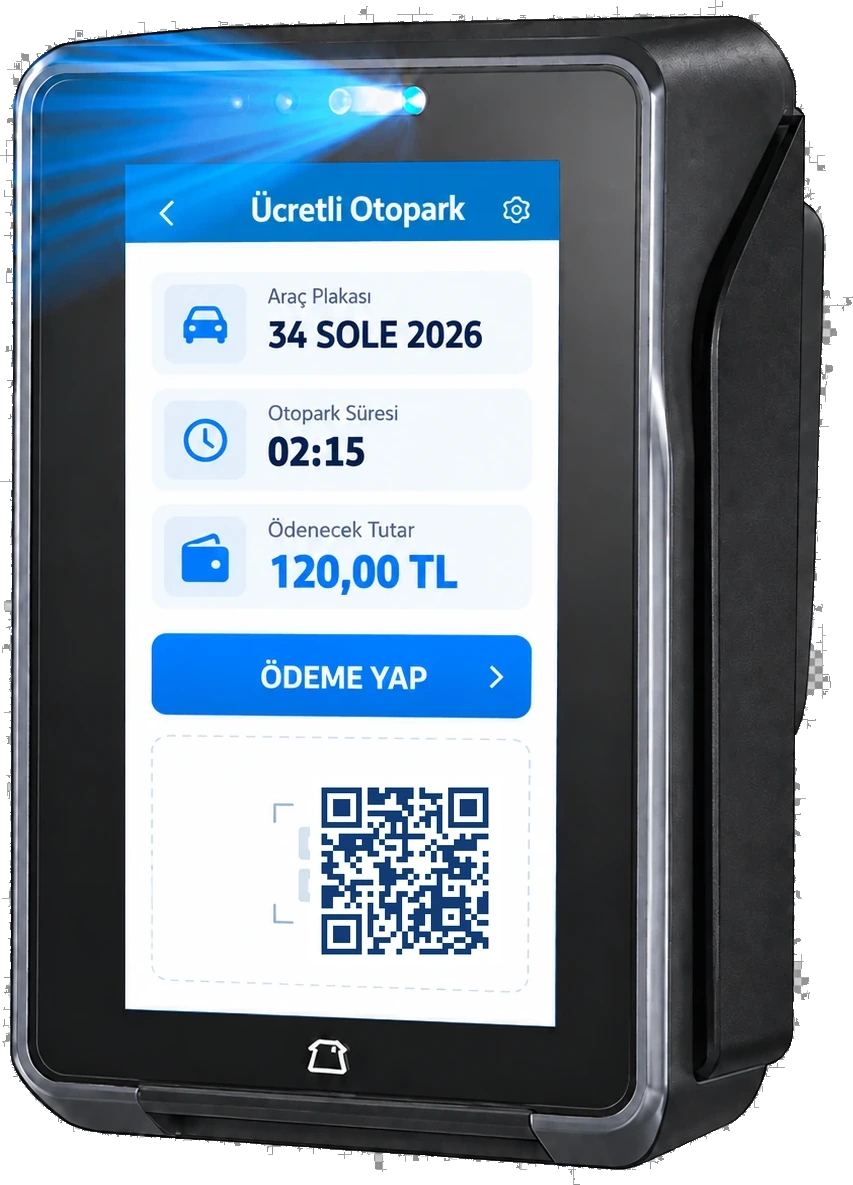
Direct answer: QR code parking payment is supported in the Sole paid parking software. The driver pays the parking fee digitally with the “Pay by QR” option at a kiosk, the Unmanned Exit Payment Terminal, a booth with a POS device or a handheld terminal. Payment approval is sent to the parking software, the fiscal receipt is issued by the POS device and an exit grant is created; the barrier opens automatically when the exit camera reads the plate.
How is parking paid with a QR code?
The driver finds the vehicle by plate at the payment point and confirms the amount on screen. At the payment step “Pay by QR” is selected; a QR payment screen opens on the POS device and payment is completed via QR with the payment app on the driver's phone. Approval is sent to the parking software, the fiscal receipt is issued by the POS device and an exit grant is created for the vehicle.
How does a QR code parking system work?
The system is based on plate recognition: the vehicle is read by the camera at entry, the entry time is recorded and the parking time starts. QR is only a method used at the payment step; no separate QR entry ticket or mobile app is needed. The fee is calculated on the server from the tariff, the QR payment approval creates an exit grant, and the barrier opens when the exit camera reads the plate.
How does the barrier open after a QR payment?
When payment is approved, the software issues a single-use exit grant for that parking session and sends it to the site PC. When the vehicle reaches the exit lane the camera reads the plate, the grant is verified on site and the barrier relay is triggered. Because verification happens on site, a paid vehicle can leave even during an internet outage.
Where is QR payment accepted?
| Payment point | Location | QR | Contactless card | Cash |
|---|---|---|---|---|
| Smart KIOSK | Pedestrian pay point, 6 languages | Yes | Yes | No |
| Unmanned Exit Payment Terminal | Exit lane, without leaving the car | Yes | Yes | No |
| Booth PC (with POS device) | Staffed or semi-unmanned booth | Yes | Yes | Yes |
| Android handheld terminal | On-site attendant | Yes | Yes | Yes |
QR payment step by step
- The vehicle is recorded by the plate recognition camera at entry and the parking time starts.
- At the payment point the driver enters the plate, or the plate comes from the exit camera.
- The fee is calculated from the tariff; any previous debt and extra services are shown on separate lines.
- “Pay by QR” is selected; a QR payment screen opens on the POS device.
- The driver completes payment via QR with the payment app on their phone.
- Approval is sent to the parking software; the fiscal receipt is issued by the POS device.
- An exit grant is created for the parking session; the exit period counts down on screen.
- The exit camera reads the plate, the grant is verified on site and the barrier opens.
- The payment and passage are written to the reports.
How is a vehicle that paid by QR recognised?
By its plate. The QR payment is tied to the parking session recorded at entry; the exit grant belongs to that session, not to the plate. When the exit camera reads the plate, the system sees the session is paid and opens the barrier.
Is a plate needed for QR parking payment?
Yes. The amount is calculated from the plate-based parking session. At the kiosk the driver types the plate; at the exit payment terminal the plate comes automatically from the exit camera. At the booth and on the handheld terminal the attendant finds the vehicle by plate.
Can QR payment be used without a kiosk?
Yes. Besides the Smart KIOSK, QR payment is also taken at the Unmanned Exit Payment Terminal, the booth PC with a POS device and the Android handheld terminal. So single-exit car parks can offer QR payment without a separate pedestrian pay point.
Does QR payment work with the plate recognition system?
Yes. QR payment is a payment step of the Sole plate recognition and paid parking software. Entry records, tariffs, payment, exit grant and barrier are managed in one system; the payment record is kept together with the photo and duration of the passage.
Can an exit period be given after a QR payment?
Yes. The period allowed to leave after payment is 20 minutes by default and can be changed per kiosk. The remaining time counts down on screen; if exceeded, only the extra time is charged.
Can QR payments be reported?
Yes. QR collections are recorded matched to parking sessions and reported per payment point. The POS Transaction Reconciliation report compares software records with POS transactions; the POS Print Report lists printed fiscal receipts and e-Archive QR codes shown on screen. Reports can be exported to PDF, Excel and Word.
What is the difference between QR and credit card payment?
The flow is the same: the amount is passed from the software to the POS device, approval triggers the fiscal receipt and the exit grant. The difference is the payment method: with a card, the card is tapped; with QR, payment is completed with the payment app on the driver's phone. It gives drivers without a card a second digital option.
e-Archive invoice QR after payment
When payment is completed, the document lookup link returned by the POS device is shown as a QR code on the payment screen; the driver can scan it to reach the e-Archive invoice. At exit points with a booth printer a receipt is also printed. This QR is for accessing the invoice, not for payment.
QR payment vs card payment
| Topic | QR payment | Contactless card payment |
|---|---|---|
| Amount entry | Automatic from software to POS | Automatic from software to POS |
| What the driver does | Pays via QR with a phone | Taps the card on the POS |
| Fiscal receipt | Issued by the POS device | Issued by the POS device |
| Exit grant | Created on payment approval | Created on payment approval |
| Reporting | Per parking session and payment point | Per parking session and payment point |
Frequently asked questions
How is parking paid with a QR code?
The driver finds the vehicle by plate at the payment point and confirms the amount on screen. At the payment step “Pay by QR” is selected; a QR payment screen opens on the POS device and payment is completed via QR with the payment app on the driver's phone. Approval is sent to the parking software, the fiscal receipt is issued by the POS device and an exit grant is created for the vehicle.
How does a QR code parking system work?
The system is based on plate recognition: the vehicle is read by the camera at entry, the entry time is recorded and the parking time starts. QR is only a method used at the payment step; no separate QR entry ticket or mobile app is needed. The fee is calculated on the server from the tariff, the QR payment approval creates an exit grant, and the barrier opens when the exit camera reads the plate.
How does the barrier open after a QR payment?
When payment is approved, the software issues a single-use exit grant for that parking session and sends it to the site PC. When the vehicle reaches the exit lane the camera reads the plate, the grant is verified on site and the barrier relay is triggered. Because verification happens on site, a paid vehicle can leave even during an internet outage.
How is a vehicle that paid by QR recognised?
By its plate. The QR payment is tied to the parking session recorded at entry; the exit grant belongs to that session, not to the plate. When the exit camera reads the plate, the system sees the session is paid and opens the barrier.
Is a plate needed for QR parking payment?
Yes. The amount is calculated from the plate-based parking session. At the kiosk the driver types the plate; at the exit payment terminal the plate comes automatically from the exit camera. At the booth and on the handheld terminal the attendant finds the vehicle by plate.
Can QR payment be used without a kiosk?
Yes. Besides the Smart KIOSK, QR payment is also taken at the Unmanned Exit Payment Terminal, the booth PC with a POS device and the Android handheld terminal. So single-exit car parks can offer QR payment without a separate pedestrian pay point.
Does QR payment work with the plate recognition system?
Yes. QR payment is a payment step of the Sole plate recognition and paid parking software. Entry records, tariffs, payment, exit grant and barrier are managed in one system; the payment record is kept together with the photo and duration of the passage.
Can an exit period be given after a QR payment?
Yes. The period allowed to leave after payment is 20 minutes by default and can be changed per kiosk. The remaining time counts down on screen; if exceeded, only the extra time is charged.
Can QR payments be reported?
Yes. QR collections are recorded matched to parking sessions and reported per payment point. The POS Transaction Reconciliation report compares software records with POS transactions; the POS Print Report lists printed fiscal receipts and e-Archive QR codes shown on screen. Reports can be exported to PDF, Excel and Word.
What is the difference between QR and credit card payment?
The flow is the same: the amount is passed from the software to the POS device, approval triggers the fiscal receipt and the exit grant. The difference is the payment method: with a card, the card is tapped; with QR, payment is completed with the payment app on the driver's phone. It gives drivers without a card a second digital option.
Last updated: September 26, 2026 · Features: Sole paid parking software
Get a free survey and quote →