
Direct answer: The Paid Parking LPR Software is parking software that calculates the stay of a vehicle recognised at entry with a tariff per vehicle class, collects the fee at the kiosk, unmanned exit payment terminal, handheld terminal or booth, and keeps cash shifts and Z reports. When the internet drops, the payment points keep working through the on-site computer. It also includes every site edition feature: live monitoring, subscribers and reporting.
Standout features
Four payment points, one till
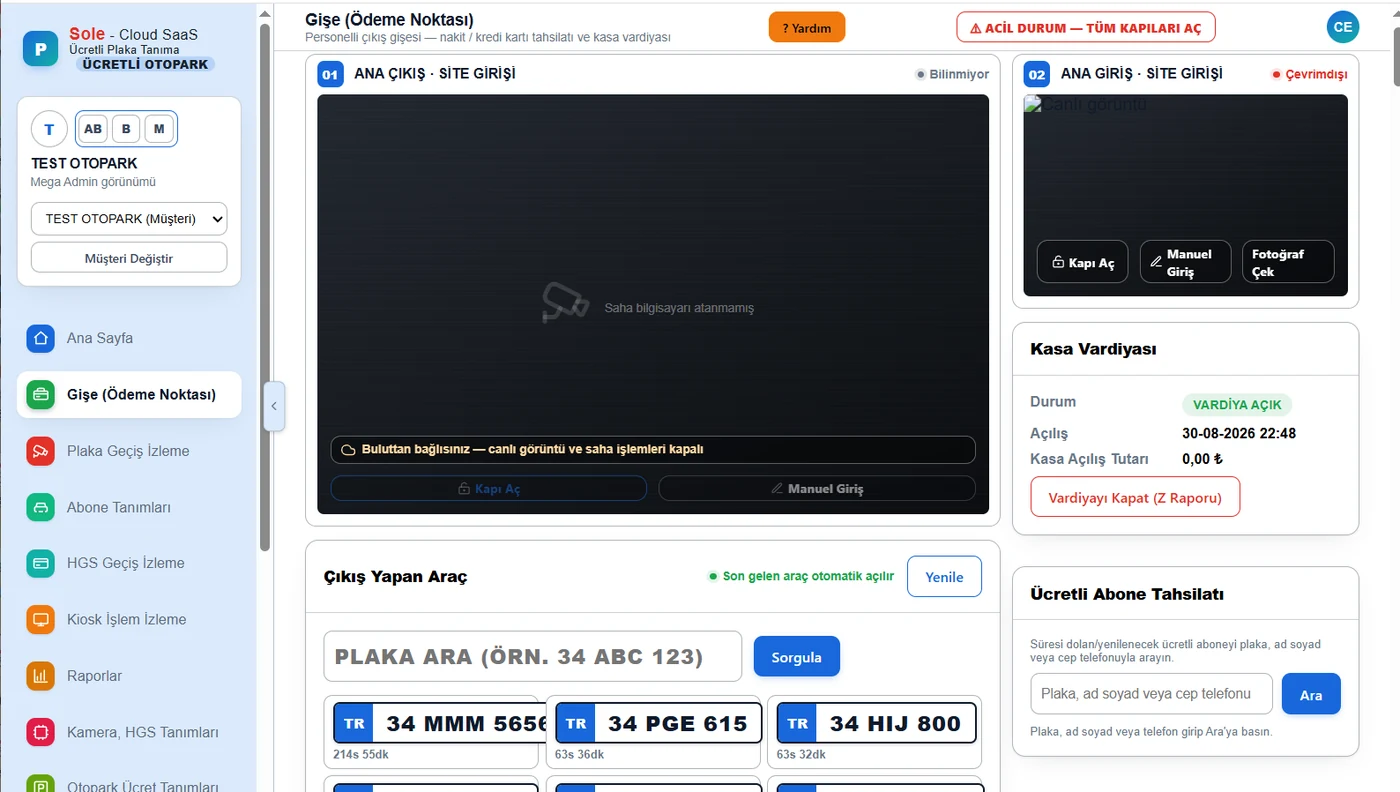
Kiosk, unmanned exit payment terminal, handheld terminal and booth run in the same car park at the same time; all collections appear on one screen and in the same reports.
Collection continues without internet
During an outage the booth, kiosk, exit terminal and handheld terminal keep taking payments through the on-site computer, or let vehicles out on debt if needed; records sync automatically when the connection returns.
Lock against double charging
The same vehicle cannot be charged at two payment points at once; uncertain cases such as “card charged, no record” are tracked as alerts in a separate list.
Fiscal receipt from the card POS device
For card, QR and cash sales the e-Archive receipt is issued by the integrated card POS device; for sales of 12,000 TL and above the buyer’s tax or national ID number is entered.
Per-device till and Z report
No collection before a shift is opened at the booth and handheld terminal; each device keeps its own till, a numbered Z report is produced at closing and its history is reported.
Remote card refund
A refund can be started from the booth for card payments taken at the exit terminal or the booth POS device; refunds are reported with their reason.
The vehicle opens at the booth by itself
The vehicle arriving at the exit appears on the booth screen automatically; while the booth is set to “closed (break)”, payment is taken at the unmanned points.
Fee class chosen from the camera
The fee class is selected from the vehicle type recognised by the camera; if it is changed, the amount is recalculated instantly.
Flexible tariff, intact history
Free period, first hour, following hours, daily cap, multi-day packages and lost-ticket fee; when the tariff changes, past transactions keep their own tariff.
Unpaid exits under control
Vehicles leaving without payment or with partial payment appear in a separate list, are recorded as debt with one click and charged on the next visit; a debt limit per plate can be set.
Orderly exit queue
A vehicle that has paid is not held; at the exit vehicles are processed first come, first out, and a free exit period after payment can be set.
Booth from the cloud
Cash can be collected at a booth connected over the internet; these payments are reconciled by the administrator in a separate report.
Extra service sales
Services such as car wash are priced by vehicle class and added to the parking fee; they can be recorded and charged immediately on the handheld terminal.
Paid subscriptions and LED alerts
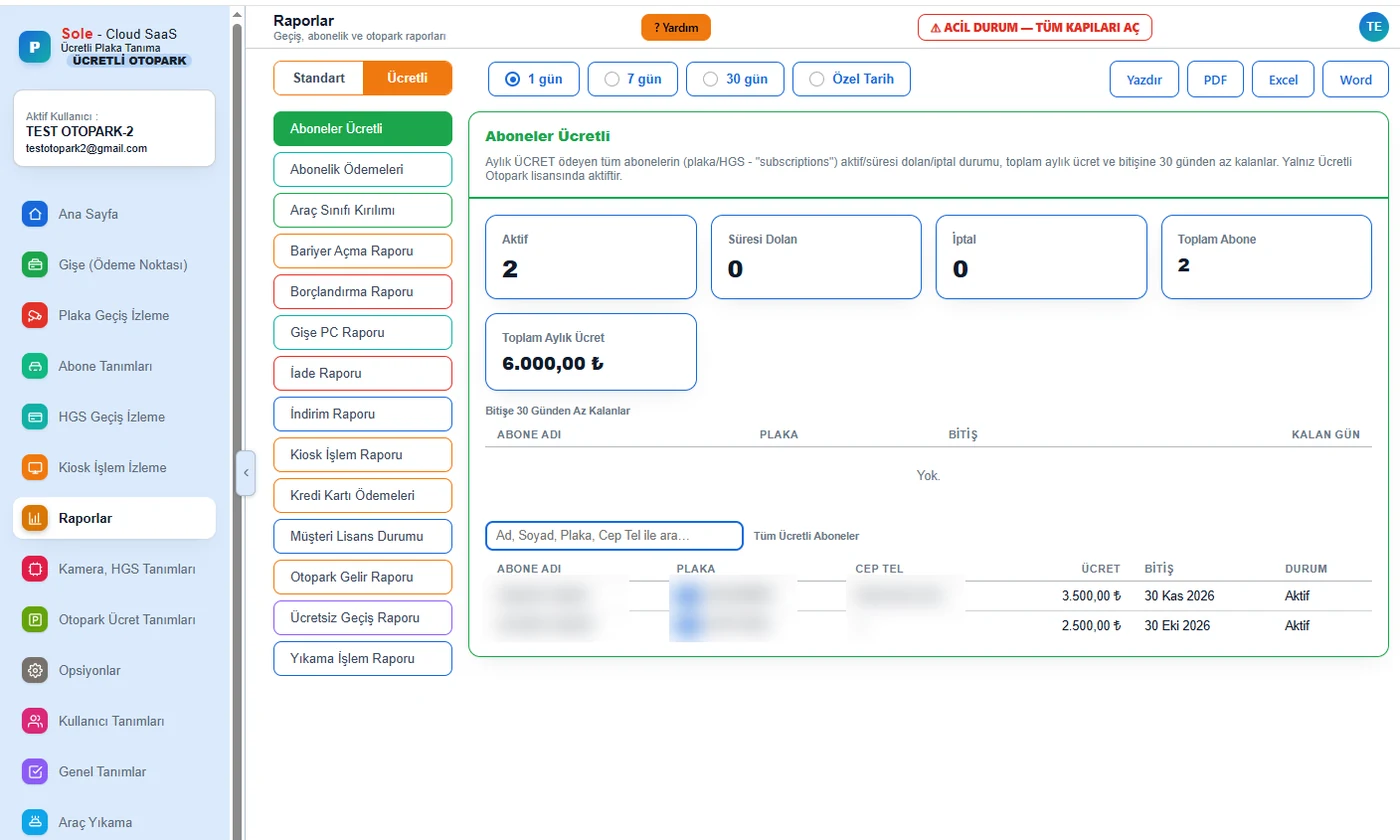
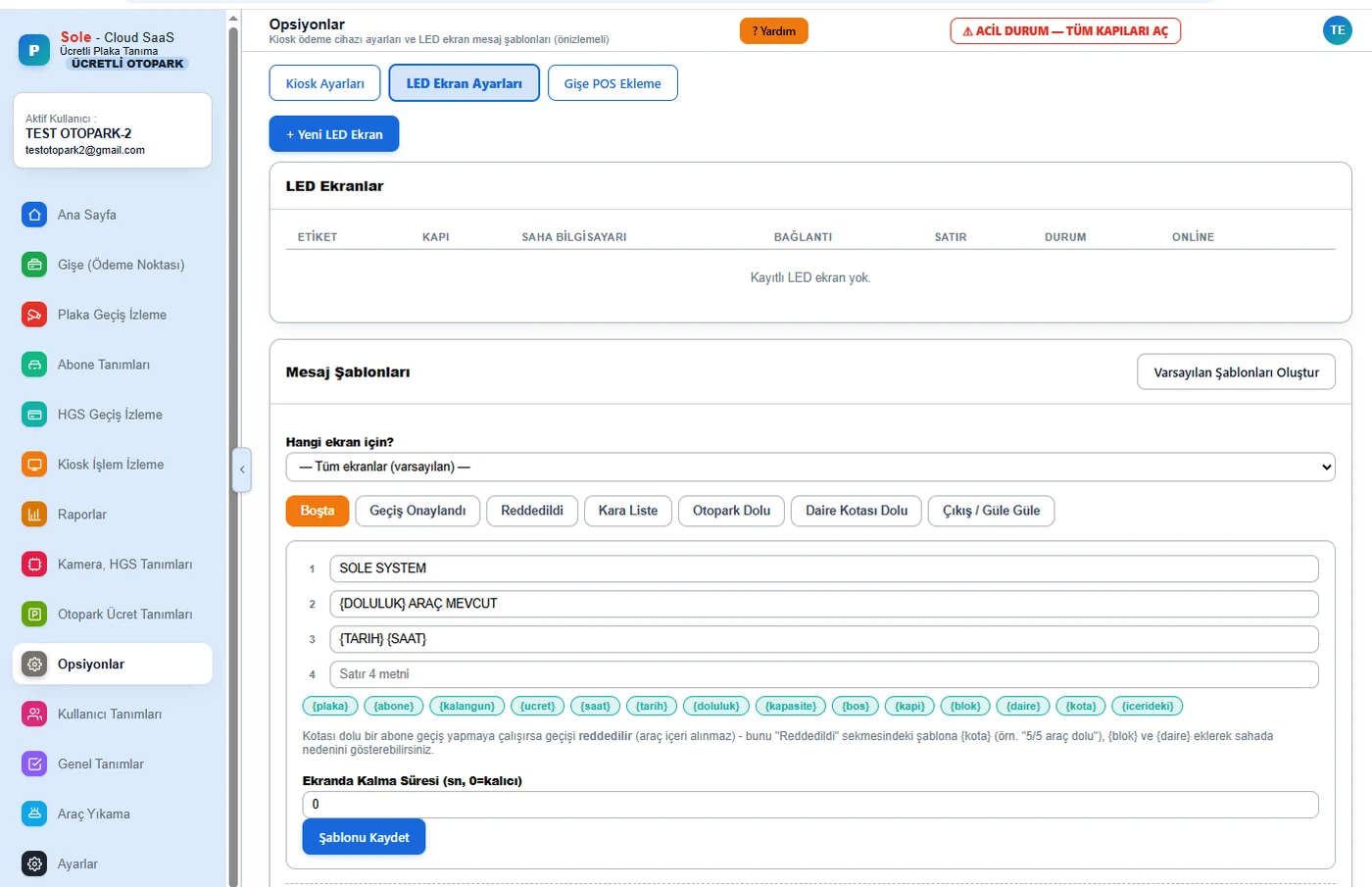
Monthly subscriptions are renewed at the booth, handheld terminal or kiosk; the LED display shows separate messages for days left, the last day and an expired subscription.
Loop + plate required gates
With a per-gate option the barrier does not open unless the ground loop and the plate match together; the reason for not opening is shown on screen.
One-click updates
The on-site software is updated from the panel with one click; the package is verified and, if the new version does not start cleanly, it rolls back automatically.
Every feature, menu by menu
The screens in the left menu of the paid parking edition and what can be done on each:
Every site edition feature included
All Plate Passage Monitoring, Subscribers, HGS Passage Monitoring, Camera and HGS Settings, Users and Settings screens are included: offline operation, restoring missed passages from the camera, blacklist alarm, one-button emergency evacuation, 45-country plates, photo archive and user permissions. See the site edition page for details.
Summary
| Payment points | Smart KIOSK, Unmanned Exit Payment Terminal, Handheld Terminal, Booth PC (with card POS device) |
|---|---|
| Payment types | Cash (booth and handheld terminal), Credit Card, Debit Card, QR Payment |
| Fiscal receipt | e-Archive receipt from the integrated card POS device; buyer tax / national ID number for sales of 12,000 TL and above |
| Access | The panel is used in a web browser; on-site software runs on the site computer |
| Tariff | Per vehicle class: free period, first hour, following hours, daily cap, packages |
| Fee class | Automatically from the vehicle type recognised by the camera; can be changed at the booth |
| Working without internet | Passages, fee calculation and collection continue on site; payment points work through the on-site computer and records sync when the connection returns |
| Collection safety | Cross-device payment lock, uncertain card records list, reasoned discounts, refunds and cancellations |
| Till | Per-device shifts, numbered Z reports with history, breakdown per cashier |
| Extra operations | Debt, discount, free passage, refund, cancel, lost ticket, car wash, subscription renewal |
| Kiosk | Fee lookup by plate, entry photo, 6 languages, transaction monitoring |
| On-site software | One-click update from the panel with automatic rollback; connection losses are monitored by our support team |
| Deployment | Cloud or on-premises server; decided per project |
| Reports | 51 ready-made reports (24 specific to paid parking); Print, PDF, Excel, Word |
Where is it used?
It is used at facilities that charge per vehicle, such as shopping malls, hospitals, hotels, business centres, bus terminals and city car parks. See our parking LPR system page for the field solution and our license plate billing guide for the fee logic.
Frequently asked questions
How is the parking fee calculated?
A free period, first hour, following hours and daily cap are defined for each vehicle class and the fee is calculated on the server. The fee class is selected from the vehicle type recognised by the camera and can be changed at the booth if needed.
Can payments be taken if the internet goes down?
Yes. The booth, kiosk, unmanned exit payment terminal and handheld terminal keep working through the on-site computer; a vehicle that cannot pay can be let out on debt. When the connection returns, records sync automatically and appear in the Internet Outage Summary report.
Can the same vehicle be charged twice?
No. While a vehicle is being processed at one payment point it cannot be charged at another. Uncertain cases where the card was charged but no record was created are kept as alerts in a separate list and resolved by the administrator.
How are the fiscal receipt and e-Archive document issued?
For card, QR and cash sales the e-Archive document is issued by the integrated card POS device; the software does not connect to the tax authority directly. For sales of 12,000 TL and above the buyer’s tax or national ID number is entered. A backup copy can be printed from the POS Print report.
Can payments be taken by credit card?
Yes. Contactless credit/debit card payments are taken at the kiosk, unmanned exit payment terminal, handheld terminal and booth; the amount is passed from the screen to the card POS device and the driver does not enter it. After approval the vehicle is granted exit permission.
Is cash accepted at the kiosk or exit terminal?
No. The kiosk and unmanned exit payment terminal work with contactless card and QR. Cash is collected at the booth and on the attendant’s handheld terminal.
Can I pay with a QR code?
Yes. A QR option is offered at the payment step of the kiosk, unmanned exit payment terminal, handheld terminal and the booth with a card POS device.
If I change the tariff, will old records break?
No. Past transactions remain calculated with the tariff of their own period.
What happens to a vehicle that leaves without paying?
The vehicle appears in the unpaid exits list and is recorded as debt with one click; on its next visit the previous debt appears in a separate box and is collected together. The maximum debt amount and count per plate can be limited.
How do I control cashiers’ collections?
No collection is possible at the booth or handheld terminal before a shift is opened; each device has its own till and a numbered Z report is produced at closing. The Booth PC and Cash Shifts reports give a breakdown per cashier; every discount, free passage, refund and cancellation requires a reason.
Can a subscription expiry warning be shown on the LED display?
Yes. In the last days of a subscription the remaining days are shown at each entry, a “last day” message on the expiry day and a separate message when the vehicle passes as paid after expiry; the texts are edited from the panel.
How is paid parking software priced?
Every car park is different: capacity, the number of entry and exit lanes, the payment points you choose (kiosk, exit terminal, booth, handheld terminal), the existing barrier and camera infrastructure on site and the installation location all directly affect the cost. That is why, instead of a fixed list price, we prepare an itemised quote tailored to your project after a free site survey, so you only pay for the hardware and modules you actually need.
To see all license plate recognition system types, camera specifications, accuracy conditions and cost logic on one page, read our license plate recognition system guide.
Last updated: October 16, 2026 · Features: Sole LPR software (paid parking)
Request a free survey and demo →