
Direct answer: The Booth Payment Point is the software screen that reads the plate of a vehicle arriving at the exit, calculates its fee from the tariff and lets the cashier collect payment in cash, by credit card POS device or by QR. In the same car park the booth, smart payment kiosk, unmanned exit payment terminal and handheld terminal work together and at the same time: wherever the vehicle pays, there is a single record and the barrier opens from the plate at the exit.
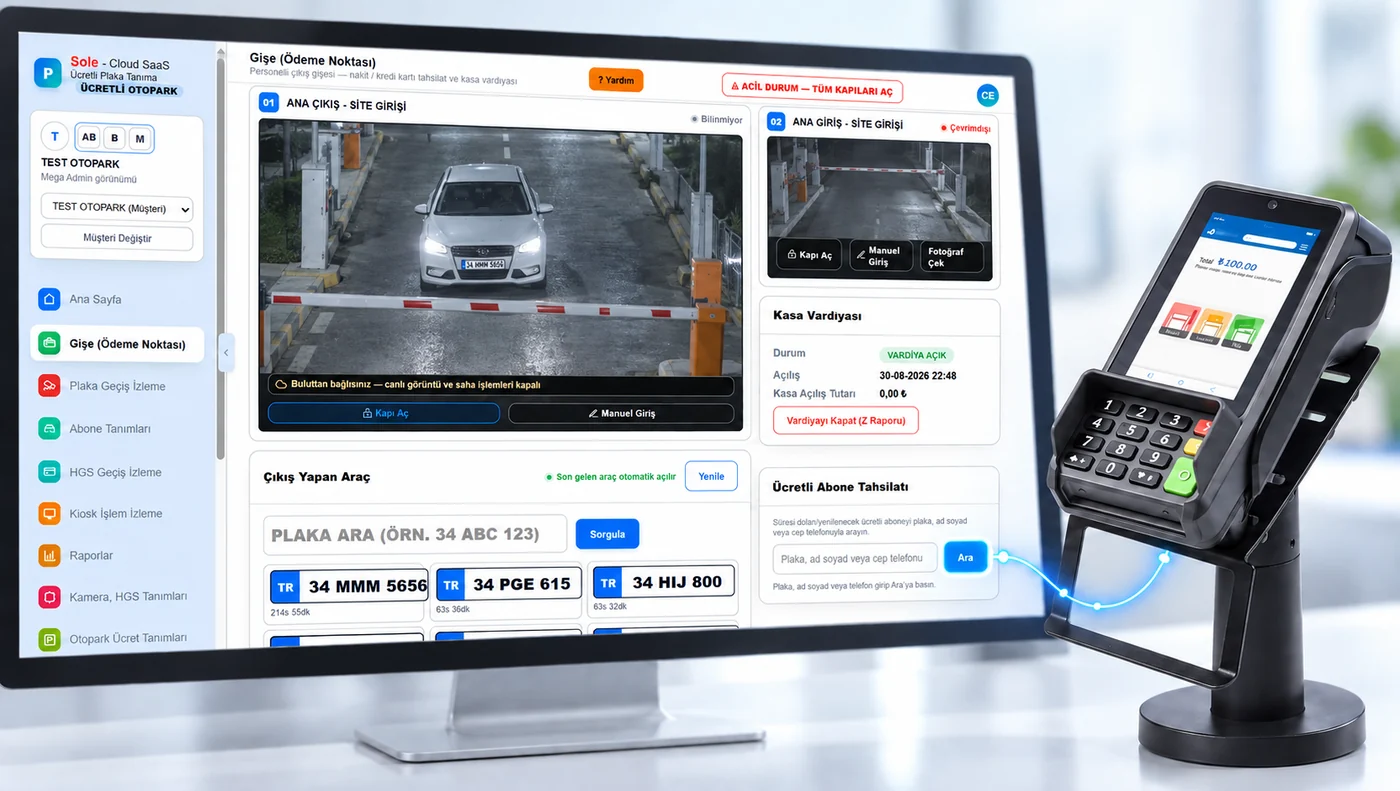
What is the Booth Payment Point?
It is the classic, staffed collection point of a paid car park. The Paid Parking LPR Software screen, opened in a web browser on the booth computer, is used together with a card POS device connected to that computer. There is no ticket, card or slip to look for: the plate was read at the entrance, it is read again at the exit and arrives in front of the cashier together with the amount due.
How is payment taken at the booth, step by step?
- The vehicle arrives at the exit: the payment point camera reads the plate and the vehicle opens on the booth screen automatically.
- The fee is calculated: on the server, from the tariff, by entry time and vehicle class; free period, daily cap, previous debt and added services (such as washing) are reflected in the amount.
- The cashier chooses the payment method: change is calculated on screen for cash; for cards the amount is sent to the POS device automatically and the driver taps or inserts the card; QR payment is also possible.
- Approval and receipt: once the card is approved the payment is recorded and the card device issues the fiscal receipt.
- Exit granted: the barrier opens and the vehicle leaves; the collection is posted to the cashier's open shift and Z report.
Classic booth collection with a card POS device
At the booth, credit and debit cards are collected with a POS device that is connected to the booth computer and issues fiscal receipts. Because the amount is not typed into the device by hand, wrong amounts and off-the-record collection are prevented; every card payment matches the record in the software and is checked in the POS Transaction Reconciliation report. The integrated card device issues the fiscal receipt; the software does not connect to the tax authority (GİB) directly. See parking POS integration for details.
What is on the booth screen?
The exiting vehicle opens by itself
The last vehicle read by the exit camera appears on the booth screen automatically; the cashier does not need to search, but can also search by plate.
Payment and entry cameras on one screen
The payment point camera is shown large and the entry camera small; open gate, manual entry and take photo buttons sit under the camera.
Vehicle card with photos
Entry and exit photos, entry time, parking duration, tariff, vehicle type, colour and make on a single card.
Cash, card and QR
Change calculation and quick amount buttons for cash; credit/debit card and QR collection from the same screen.
The amount goes to the card terminal automatically
For card payments the amount is never typed by hand; the fee on screen is sent to the POS device and the exit is granted once approved.
Discounts and free exits with a reason
Discounts (percentage or amount), free exits, refunds and cancellations require a reason and appear separately in reports.
Debt and previous debt
A vehicle leaving without paying can be charged as debt; previous debt and added services appear in a separate box and are collected together.
Paid subscriber collection
Paid subscribers whose period has ended or is due are found by plate, name or phone; renewals are collected at the booth.
Cash shift and Z report
No collection is possible before a shift is opened; closing the shift produces a numbered Z report.
One system, four payment points
The Booth Payment Point can be used on its own or installed together with unmanned payment points. All of them are connected to the same cloud software and use the same tariff:
| Payment point | Who uses it? | Payment method | When does it stand out? |
|---|---|---|---|
| Booth Payment Point | Cashier at the booth (staffed) | Cash, credit/debit card, QR | During working hours, for drivers who pay cash or need help |
| Smart Payment Kiosk | Driver, before returning to the car (self-service) | Credit/debit card, QR — no cash | 24/7; takes queues away from the booth at pedestrian exits and lifts |
| Unmanned Exit Payment Terminal | Driver, from the car in the exit lane | Credit/debit card, QR — no cash | 24/7; runs the exit on its own when the booth is closed |
| Handheld Terminal | Attendant on site, beside the vehicle | Cash, card, QR depending on the device model | To clear queues at peak hours and in open car parks |
How do the booth and unmanned payment work at the same time?
All payment points work on the same vehicle record. Whether the driver pays the cashier at the booth, at the kiosk, at the exit terminal or to an attendant with a handheld terminal, the payment is posted to that vehicle's single record and a fee already paid is never requested again at another point. The plate of a vehicle that paid at the kiosk or handheld terminal is recognised at the exit and the barrier opens within the post-payment exit period without stopping at the booth.
- Plate read at entry
- Payment at booth, kiosk, terminal or handheld
- Payment posted to one record
- Plate recognised at exit
- Barrier opens
So while the cashier is working at the booth, the unmanned points keep collecting too; queues are split at peak hours and only drivers who want to pay cash or need help remain at the booth.
Which payment point at which hours?
The operator decides which point is used at which hours according to its own shift plan; all points can also stay open at the same time. Common operating models:
- Classic booth: all collection is done by the cashier and the card POS device.
- Staffed by day, unmanned by night: the booth works during working hours; when it closes, the unmanned exit payment terminal in the exit lane keeps collecting 24/7.
- Booth + kiosk: most drivers pay at the kiosk before returning to the car and drive straight out; the booth remains for cash and help.
- Handheld terminal at peak hours: the attendant walks to the queuing vehicles and takes payment there.
- Fully unmanned: the booth is not used at all; the kiosk and exit terminal are enough. See the unmanned paid parking system page for details.
One view of cash, shifts and reports
At the booth and on the handheld terminal no collection is possible before a shift is opened; closing the shift produces a numbered Z report with a per-cashier breakdown. The home page shows daily revenue separately for cash, credit card and kiosk. Each payment point is also tracked in reports: Booth PC, Kiosk Transactions, Exit Terminal, Handheld Terminal, Credit Card Payments, POS Transaction Reconciliation, Discount, Refund and Payment Recovery. For report details see the parking reporting system page.
Where is it used?
In facilities that charge per vehicle such as shopping malls, hospitals, hotels, business centres, bus terminals and city car parks; installing the booth together with unmanned payment points is especially recommended where demand for cash payment continues but staff costs at night and on weekends should be reduced. To turn an existing booth-operated car park unmanned step by step, see our conversion guide.
Summary
| Payment points | Booth PC (staffed), Smart KIOSK, Unmanned Exit Payment Terminal, Handheld Terminal — at the same time |
|---|---|
| Payment methods at the booth | Cash (with change calculation), credit/debit card (POS device), QR |
| At the kiosk and exit terminal | Credit/debit card and QR; no cash |
| Fiscal receipt | Issued by the integrated card device (fiscal POS) |
| Fee calculation | On the server, from the tariff by vehicle class; the same amount at every payment point |
| Exit | The barrier opens from the plate within the post-payment exit period |
| Cash management | Open/close shift, numbered Z report, per-cashier breakdown |
| Access | Web browser — no program is installed on the booth computer |
Frequently asked questions
Which payment methods are used at the booth?
Cash (change is calculated on screen), contactless or inserted credit/debit cards and QR payment. For card payments the amount is sent from the booth screen to the POS device automatically.
Is the amount typed into the card POS device by hand?
No. The fee on screen is sent to the card device by the software, so wrong amounts are not entered and every card payment matches the record in the software.
How do vehicles leave when the booth is closed?
They pay by card or QR from the car at the unmanned exit payment terminal in the exit lane; for vehicles that already paid at the kiosk the barrier opens from the plate automatically.
Can the same vehicle be charged at two different points?
No. All payment points work on the same vehicle record; a fee already paid is not requested again at another point and the barrier opens from the plate at the exit.
Is cash accepted at the kiosk or exit terminal?
No. The kiosk and the unmanned exit payment terminal work with credit/debit cards and QR; cash is taken at the booth and on the handheld terminal.
How do I check the cashier's collections?
No collection is possible before a shift is opened; closing the shift produces a numbered Z report. The Booth PC report gives a per-cashier breakdown and card payments are compared with POS records in the POS Transaction Reconciliation report.
How is the fiscal receipt issued?
The integrated card device (fiscal POS) connected to the booth computer issues the fiscal receipt; the software does not connect to the tax authority (GİB) directly.
To see all license plate recognition system types, camera specifications, accuracy conditions and cost logic on one page, read our license plate recognition system guide.
Last updated: October 7, 2026 · Features: Sole LPR software (paid parking)
Request a free survey and demo →