
Direct answer: Handheld Terminal Payment is a mobile booth where the parking attendant collects the fee at the car with an Android-based payment device. The attendant finds the vehicle by plate; the amount is calculated on the server, payment is taken by cash, contactless card or QR code and the fiscal receipt prints on the device's own printer. Subscription renewal, past-debt collection and barrier opening with a reason are done on the same device.
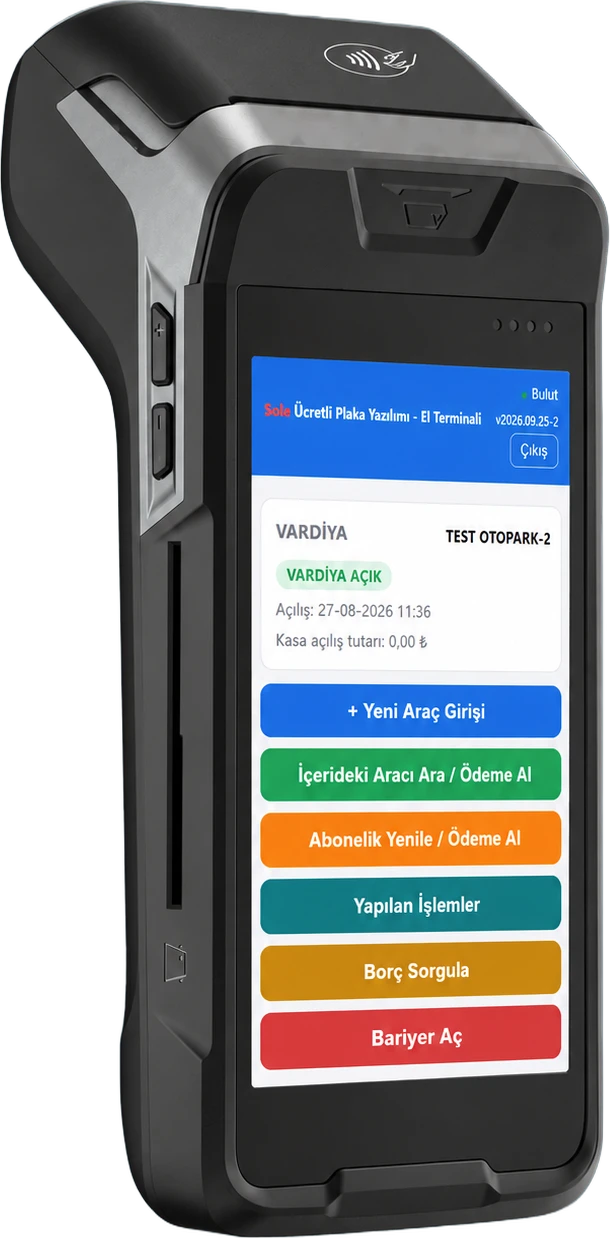
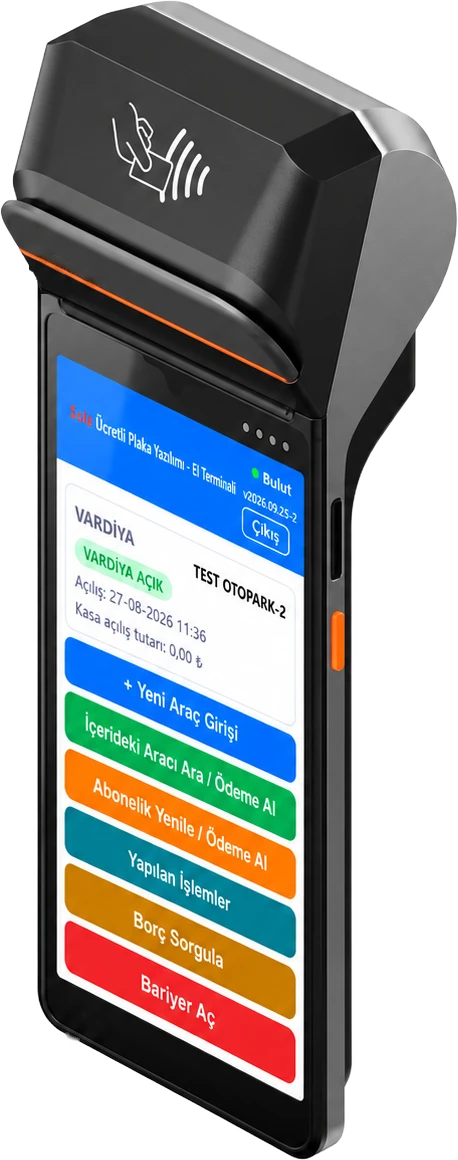
What can be done on the handheld terminal?
Shift
The attendant opens a shift with an opening cash amount; collections and debt actions are only possible with an open shift.
+ New Vehicle Entry
At points without a camera, a manual entry is recorded with plate, optional photo and note; the entry time can be edited.
Find Vehicle Inside / Take Payment
Vehicles inside are listed oldest first and can be searched by plate; on the payment screen the fee is calculated on the server.
Renew Subscription / Take Payment
A paid subscriber is found by plate or name; renewal by month or day, recorded as cash, card, QR or debt.
Transactions
This device's entries, collections and subscription payments are listed for 1, 3, 7 days or a custom range.
Check Debt
An open debt is found by plate and collected by cash or card, even if the vehicle is not in the car park.
Open Barrier
Gates with an active camera are listed; the barrier does not open without a reason, and the opening is logged.
Paying on the handheld terminal, step by step
- 1. The attendant has opened a shift; the cloud connection indicator in the top bar is green.
- 2. With “Find Vehicle Inside / Take Payment” the vehicle is picked from the list or found by plate.
- 3. The fee is calculated on the server from the tariff; the vehicle's past open debts are pre-selected and added to the total.
- 4. If needed the vehicle class is changed, a service such as car washing is added or a discount with a reason is applied; the amount is recalculated.
- 5. The payment method is chosen: for cash the amount received is entered and change is calculated; for card or QR the amount is passed to the device's POS.
- 6. The fiscal receipt prints on the device's own printer; payment or a debt recorded with a reason creates an exit grant for the vehicle.
- 7. The transaction is written to the Handheld Terminal report and the receipt record to the POS Print Report.
Which payment methods are supported?
| Method | Status | Note |
|---|---|---|
| Cash | Yes | Amount received is entered, change is calculated |
| Contactless credit/debit card | Yes | Amount passed to the device's POS; the attendant does not type it |
| QR code | Yes | For parking fees and subscription payments |
| Record as debt | Yes | Reason required; collected on the next visit |
| Fiscal receipt | Yes | From the device's printer, 58 mm, customer copy |
The handheld terminal needs an internet connection to process transactions; the cloud indicator in the top bar shows the connection status. Without a connection no transaction is taken and a warning appears on screen.
Two device models
The Card-Payment Handheld Terminal with Fiscal Receipt takes cash, contactless card and QR payments and prints the fiscal receipt on its own printer. The Cash-Payment Handheld Terminal with Printer is used for cash collection only and prints a customer information slip with no fiscal value after each collection. Both models use the same software and the same reports.
Security and control
- The device is linked to the facility with a 12-digit pairing code generated in the panel; the attendant also signs in with their own email and password.
- An open shift is required for collections; the shift starts with an opening cash amount.
- Discounts, debt recording and barrier openings require a reason and are logged.
- The barrier can only be opened at gates with an active camera.
- All transactions are tracked in the Handheld Terminal report in the panel, and printed receipts in the POS Print Report.
- If a card is charged but the system record cannot be saved, the device warns “do not charge again” with the order and sale numbers.
Where is it used?
Peak hours
The attendant walks along the exit queue and takes payment at the car, shortening the wait at the barrier.
Open-air and event parking
Works as a mobile booth at temporary or open car parks without a booth.
Backup payment channel
If a kiosk or exit payment terminal fails, collection continues on the handheld terminal.
Drivers paying cash
In a semi-unmanned model, kiosks and terminals take cards while cash is taken on the handheld terminal.
Handheld terminal, kiosk and exit payment terminal compared
| Topic | Handheld Terminal | Smart Payment Kiosk | Unmanned Exit Payment Terminal |
|---|---|---|---|
| Used by | On-site attendant | Driver | Driver |
| Location | In the attendant's hand, at the car | Pedestrian pay point | Exit lane |
| Plate | Attendant picks or searches | Typed by the driver | Comes from the exit camera |
| Payment | Cash, contactless card, QR | Contactless card, QR | Contactless card, QR |
| Cash | Yes | No | No |
| Subscriptions and debt | Renewal and debt collection | Subscription renewal | — |
| Staff | Required | Not required | Not required |
Frequently asked questions
What is handheld terminal parking payment?
A mobile booth where the parking fee is collected at the car with an Android payment device in the attendant's hand. The attendant finds the vehicle by plate, the fee is calculated on the server and payment is taken by cash, contactless card or QR.
Which payment methods does the handheld terminal support?
The card-payment model takes cash, contactless credit/debit cards and QR codes; the cash-payment model with printer takes cash. A debt can also be recorded with a reason.
Does the handheld terminal print a receipt?
Yes. The card-payment model prints the fiscal receipt on its own printer; the cash-payment model with printer prints a customer information slip with no fiscal value after each collection.
Does the handheld terminal work without internet?
No. A connection is required; if it drops, a warning appears on screen and no transaction is taken.
Can the barrier be opened from the handheld terminal?
Yes. Gates with an active camera are listed; the barrier opens once a reason is entered and the opening is logged.
Can it be used at an entry without a camera?
Yes. With “New Vehicle Entry” a manual entry is recorded with plate, optional photo and note.
Last updated: September 27, 2026 · Sole paid parking payment points · Gray Teknoloji Sistemleri Ltd. Şti.
Get a Free Site Survey →