
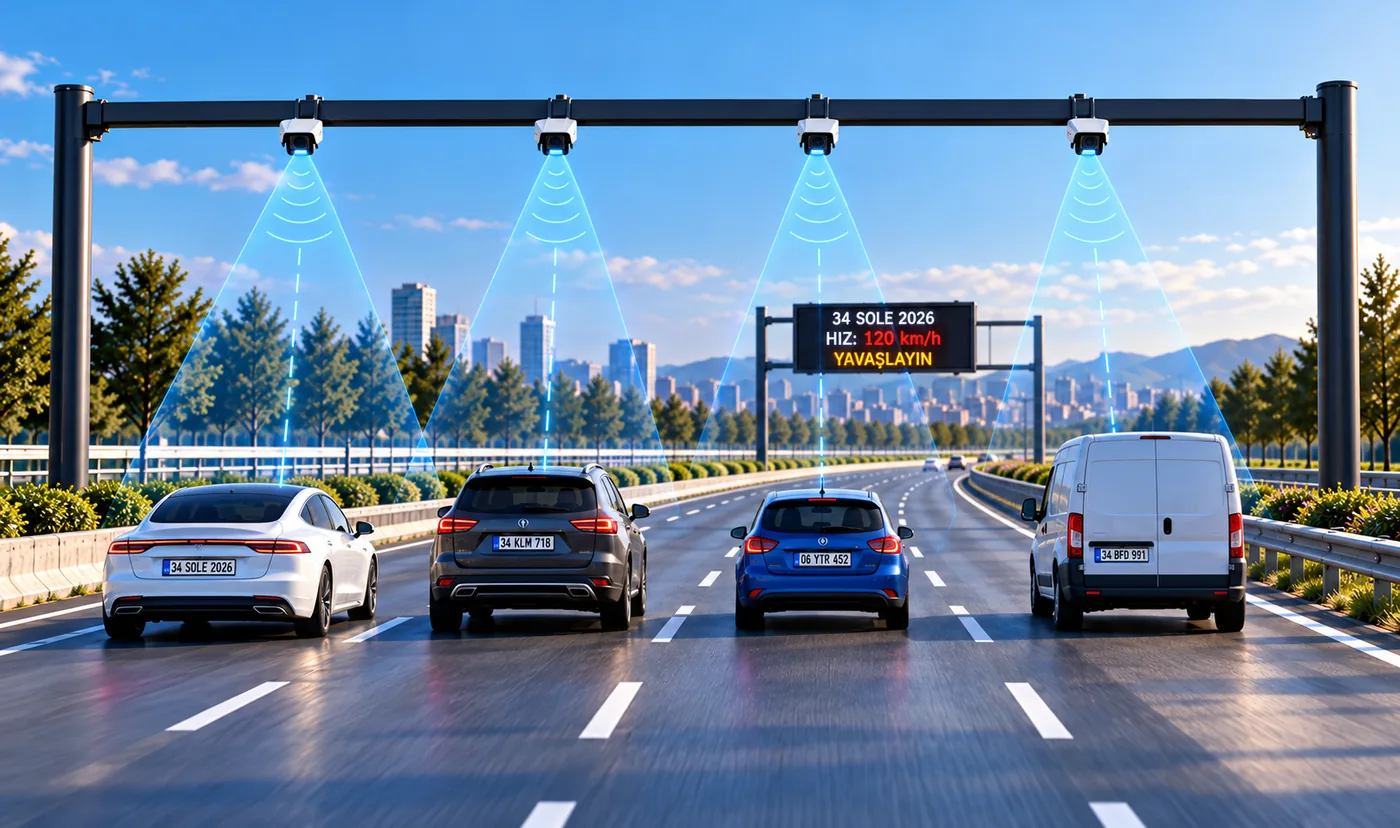
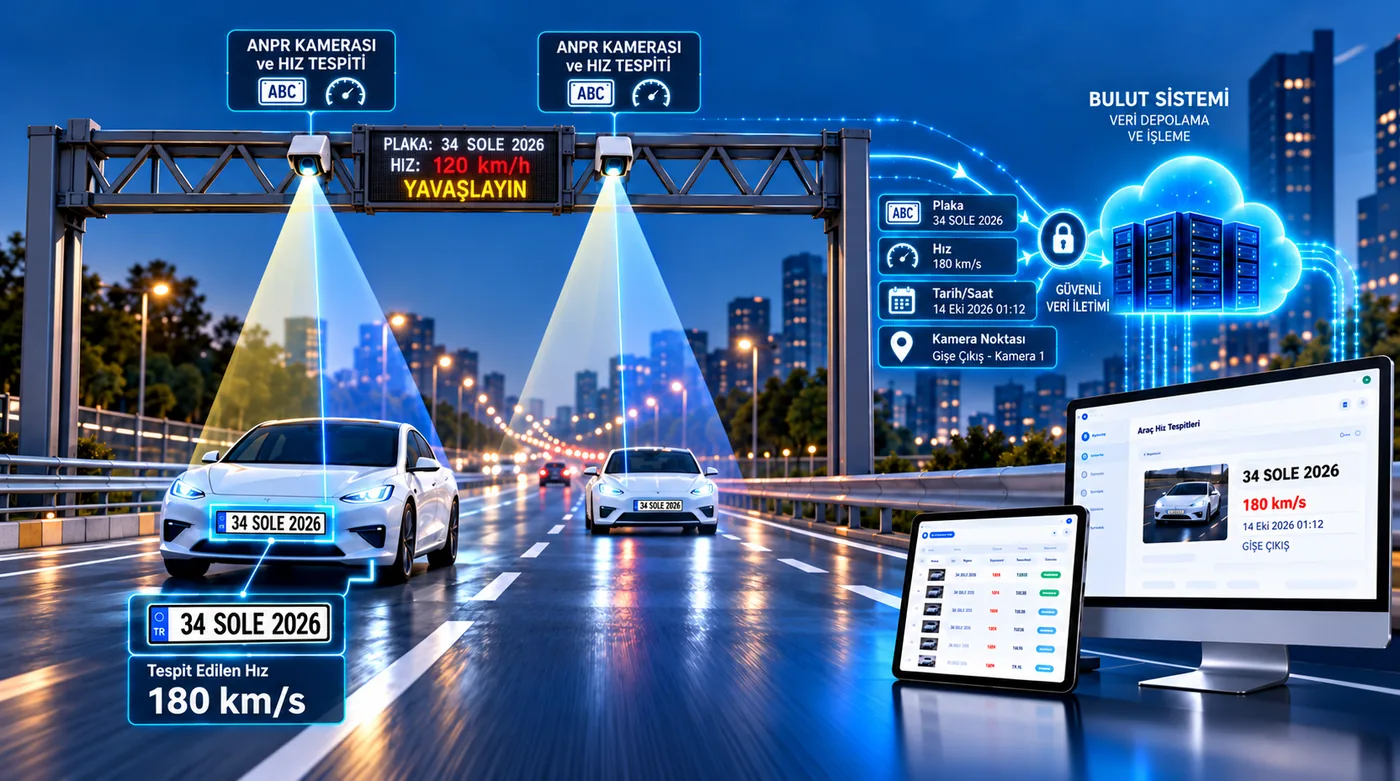
Direct answer: A vehicle speed detection system with license plate recognition measures the speed of every passing vehicle with speed detection cameras placed on the road, reads the plate at the same moment and joins both in a single record. When the speed limit you set is exceeded, the driver is warned instantly on an LED display, the violation is saved with its photo, an email goes to the people in charge and every record can be monitored and reported on the Vehicle Speed Detections screen of the software. The system is designed for the private roads of facilities such as residential sites, factories, campuses, industrial zones, ports and hospitals.
What is a vehicle speed detection system?
A vehicle speed detection system (also called a speed measurement, speed enforcement or radar speed detection system) automatically measures the speed of vehicles passing on a road and records those exceeding the set limit. Combined with license plate recognition, the measured speed is matched with the vehicle’s plate and photo, so “which vehicle passed, when, where and at what speed” is answered by a single record.
The system has three parts: the speed detection camera on the road, the LED display that warns the driver and the cloud software where records are monitored. The aim is not to issue fines but to improve pedestrian and workplace safety on site and to make the speed rule visible and auditable.
How does the system work?
- Measurement: The speed detection camera measures the speed of a vehicle entering its field of view using radar and video together; the same camera also reads the plate.
- Decision: The software compares the measured speed with the speed limit and measurement tolerance you defined for that camera. The record is marked “speed violation” if the limit is exceeded, otherwise “normal”.
- Warning: The LED display linked to the camera shows the vehicle’s speed; on a violation the text turns red with a slow-down warning.
- Record: Plate, speed, speed limit, amount over the limit, date-time, camera point and the violation photo are stored in one record.
- Notification: An email is sent to the people you choose at the moment of the violation; its link opens the record directly after sign-in.
- Monitoring and reports: All measurements are listed live in the software, filtered and exported to Excel or PDF.
How are the speed limit and tolerance set?
Each speed detection camera has its own speed limit, so different limits can apply at the entrance, at a pedestrian crossing or on a straight road. The limit can be set between 5 and 180 km/h. A measurement tolerance of 0–20 km/h can also be given per camera; a violation is counted only when the speed exceeds the limit plus the tolerance.
The violation decision is stored together with the limit and tolerance valid at the moment of measurement. Even if you change the limit later, old records keep the values that applied that day; limit changes are also logged with who made them and when.
Instant driver warning on the LED display
A speed detection camera is paired with one or more LED displays. As the vehicle passes the measurement point its speed appears on the display: green when under the limit, red with a slow-down warning when over. The display text can be edited with templates and may include the measured speed, the limit and the amount over. Showing the plate on the display is optional and off by default; when shown, the plate is partially masked.
Where is it monitored in the software?
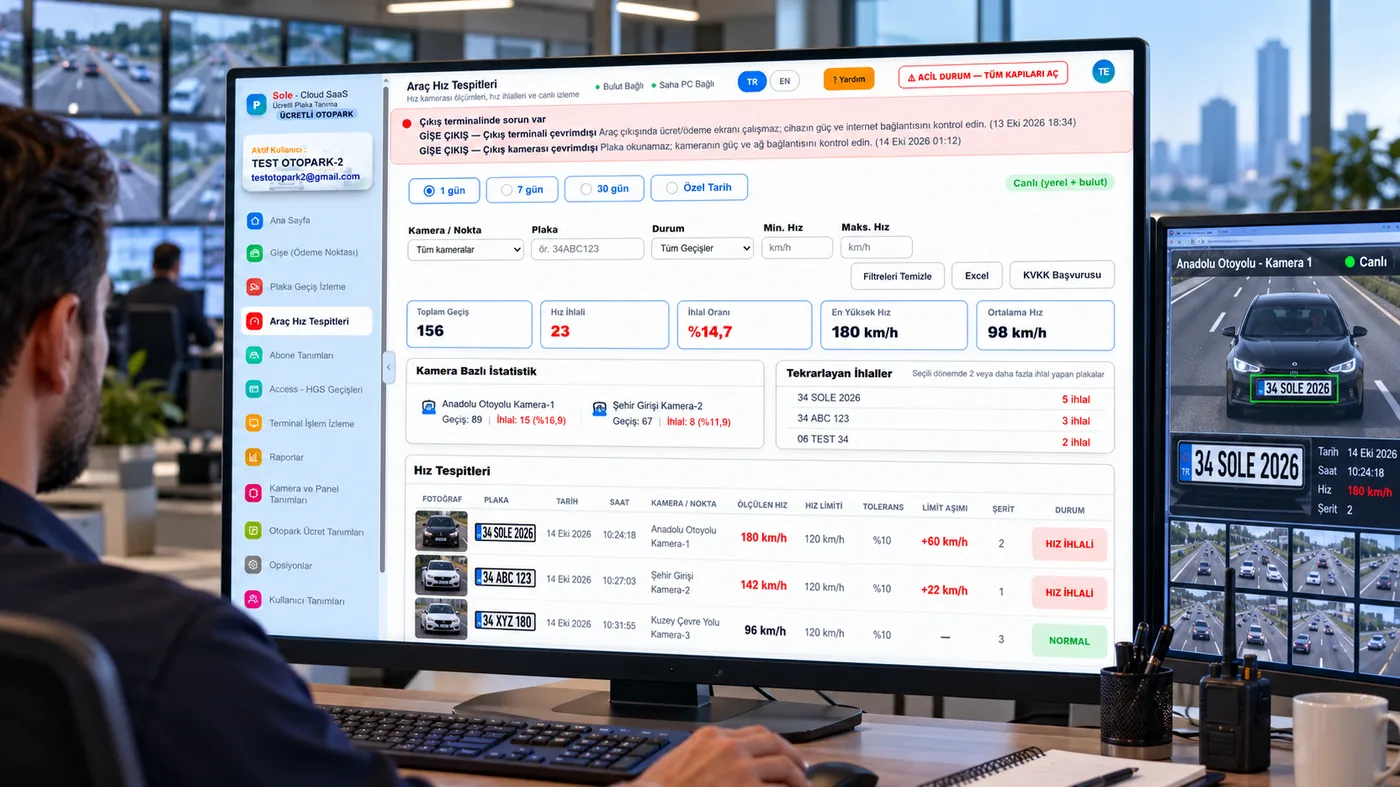
The Vehicle Speed Detections page in the left menu of the cloud software is where all speed measurements are collected. Speed records are kept separate from barrier and passage records and do not mix into subscriber, visitor or occupancy reports.
- Date selection: 1 day, 7 days, 30 days or a custom range.
- Filters: camera/point, plate, status (all passages, speed violation, normal) and minimum – maximum speed.
- Summary cards: total passages, number of violations, violation rate, highest speed and average speed.
- Per-camera statistics: passages and violations at each measurement point.
- Repeat violations: plates with more than one violation in the selected period; clicking a plate filters the list to that vehicle.
- Live list: new measurements drop into the list without refreshing; violation rows stand out in red.
Clicking a row opens the Speed Detection Detail: violation photo, plate, measured speed, limit, tolerance, amount over, lane, camera point and date-time on one screen.
Reporting and notifications
- Single record report (PDF / print): a document with photo, report number, the user who created it and the creation time for each detection.
- Excel export: the filtered list is exported with one click.
- Speed Detection Report: the ready-made report in the Reports section lists measurements for the selected period and can be scheduled for daily or weekly email delivery.
- Instant violation email: up to 20 recipients are notified. To keep inboxes clear when the same vehicle passes several points in a row, a per-plate repeat limit can be set; records are still kept in full.
How it differs from speed bumps, signs and speed displays
Speed bumps, signs or displays that only show the speed are the usual ways to slow traffic on site roads. A speed detection system with plate recognition also records who was speeding:
| Method | Warns the driver | Measures speed | Identifies the vehicle (plate) | Records and reports |
|---|---|---|---|---|
| Warning sign | Yes | No | No | No |
| Speed bump | Physically | No | No | No |
| Speed display only | Yes | Yes | No | Limited |
| Speed detection with LPR | Yes (LED display) | Yes | Yes | Photo record, email, reports |
Repeat violations by the same vehicle become visible, shuttle, contractor or visitor vehicles can be followed separately and warnings rest on concrete records.
Installation and choosing measurement points
Measurement points are decided together during the free site survey. General principles:
- Point selection: places where speed creates risk, such as pedestrian crossings, junctions, loading areas and long straight roads, come first.
- Camera placement: the speed detection camera is placed above or beside the road facing the vehicle; one camera covers one or two lanes and wider roads need more cameras.
- LED display: placed where the driver can see it comfortably right after the measurement point; one camera can drive more than one display.
- Night and bad weather: the camera reads plates at night with its own illumination; speed is measured by radar, so it works day and night.
- Connection: measurement points connect to the on-site computer over the network; a wireless link is used where cabling is not possible.
What happens if the internet goes down?
Measurement, the violation decision, the LED warning and photo capture run on the on-site computer, so the system keeps measuring and warning during an outage. Records created while offline wait on site and are sent to the cloud automatically when the connection returns. Emails for violations collected during an outage are sent marked as delayed; if many have built up, a single summary email is sent instead. See working without internet for details.
Personal data and privacy
Because speed records contain plates and photos, the system is built to keep data limited:
- You choose whether plate and photo are stored for vehicles that do not exceed the limit; by default they are not, and only speed and time are kept for statistics.
- Violation records are not deleted at the end of the retention period (6 months by default) but anonymised: plate and photo are removed while speed, time and camera remain for statistics.
- Only authorised users see the Vehicle Speed Detections page and report; detail views and exports are logged.
- An administrator can export the records of a plate or anonymise them in one step (data subject request).
Obligations such as the privacy notice and warning signage belong to the facility management as data controller.
Where is it used?
It is used wherever the operator sets the speed limit: internal roads of residential sites, factories and logistics yards, industrial zones, university and hospital campuses, ports, bus terminals and large car parks. The system serves on-site safety and internal control; it does not issue official traffic fines. Records are used for warnings, internal rules and driver or contractor follow-up.
Speed detection can be added as a module to an existing site or paid parking LPR system, or installed on its own for speed detection only. On long roads where cabling is difficult, measurement points can communicate over a wireless link.
Quick technical facts
| Measurement method | Speed detection camera using radar and video together; plate reading with the same camera |
|---|---|
| Speed limit | Separate per camera, 5–180 km/h |
| Measurement tolerance | 0–20 km/h per camera |
| Driver warning | Speed on LED display; red slow-down warning on violation |
| Record content | Plate, speed, limit, amount over, lane, camera point, date-time, violation photo |
| Monitoring | Vehicle Speed Detections page in the cloud software (live list, filters, summary cards) |
| Reports | Numbered PDF, Excel, scheduled Speed Detection Report |
| Notification | Instant violation email, up to 20 recipients, adjustable repeat limit |
| Internet outage | Keeps working on site, automatic upload when the connection returns |
| Data retention | Violation records anonymised after 6 months by default |
Frequently asked questions
What is a vehicle speed detection system with LPR?
It measures a vehicle’s speed with a speed detection camera on the road, reads its plate at the same moment and joins both in one record. When the limit is exceeded it warns the driver on an LED display, saves the violation with a photo and notifies the people in charge.
Does this system issue traffic fines?
No. It is used on the private roads of facilities such as sites, factories and campuses for safety and internal control; it does not issue official traffic fines.
Where are speed violations monitored in the software?
On the Vehicle Speed Detections page of the cloud software. Records are filtered by date, camera, plate, status and speed range; total passages, violations, violation rate, highest and average speed appear in summary cards.
Can each point have a different speed limit?
Yes. The speed limit and measurement tolerance are set per camera; the limit between 5 and 180 km/h and the tolerance between 0 and 20 km/h.
Who is notified when a violation occurs?
The email addresses you define (up to 20 recipients) are notified instantly. A repeat limit can be set so the same vehicle does not trigger repeated emails within a short time.
Does speed measurement stop if the internet goes down?
No. Measurement, the LED warning and recording run on the on-site computer; stored records are sent to the cloud automatically when the connection returns.
How long are speed records kept?
Violation records are anonymised at the end of the retention period (6 months by default): plate and photo are removed while speed and time remain for statistics. For non-violating passages plate and photo are not stored by default.
Are speed detection and speed measurement systems the same thing?
Yes. Speed detection, speed measurement, speed enforcement and radar speed detection systems describe the same solution: measuring vehicle speed automatically and recording those over the limit.
How many lanes does one speed detection camera cover?
One camera covers one or two lanes. Wider roads use a separate camera for each lane group; the number is decided during the site survey.
Does the system measure speed at night?
Yes. Speed is measured by radar, so it works day and night; the camera reads plates at night with its own illumination.
Can speed detection be added to my existing LPR system?
Yes. It can be added as a module to an existing site or paid parking LPR system and appears as a separate page in the same software.
Does speed measurement affect barrier passages?
No. Speed records are kept separate from barrier and passage records and do not mix into subscriber permissions, visitor or occupancy figures.
To see all license plate recognition system types, camera specifications, accuracy conditions and cost logic on one page, read our license plate recognition system guide.
Last updated: October 14, 2026 · Features: Sole Cloud SaaS LPR software (Vehicle Speed Detections module)
Request a free site survey and quote →